tutorial
Email Marketing Automation for Shopify: The 5 Flows That Actually Pay Off
We tested Shopify email flows across real stores for 90 days. The five that pay for the platform inside 30 days, in priority order, with triggers.
 By Manu A. · · 13 min read ·
Updated
By Manu A. · · 13 min read ·
Updated 
If you’ve been running a Shopify store for any length of time, you’ve heard “you should be running email automations.” Less common is anyone walking you through which automations actually move the revenue needle, in what order, with what triggers.
We tested every common Shopify automation flow across two real test stores (one $8k/month DTC apparel, one $45k/month subscription box) for 90 days. The honest answer: five flows generate roughly 85% of all email-attributed revenue. The other “best practice” flows you hear about (birthday emails, VIP tiers, replenishment reminders) are real but contribute meaningfully less.
This is the playbook. Build them in this priority order.
Quick verdict. Build these five flows in this order: abandoned cart (highest immediate ROI), welcome series (highest acquisition ROI), post-purchase (highest retention ROI), browse abandonment (mid-funnel revenue), win-back (lapsed customer revenue). Run them on Klaviyo if your store does $10k+/month — the platform’s depth pays back quickly. We covered the Klaviyo vs Mailchimp comparison for stores making that decision.
What you’ll need
- A working Shopify store with at least 30 days of data (existing customers, abandoned cart history)
- An email platform with native Shopify integration. Klaviyo is the strong default; MailerLite or Mailchimp work but with reduced depth (we covered this in Klaviyo vs Mailchimp) If you have not chosen one yet, start with our best email marketing software for ecommerce comparison, which prices all seven at real store sizes.
- Roughly 6-8 hours of focused setup time spread across 1-2 weeks
- Brand assets ready: logo, primary color, 2-3 hero product photos
- A basic list of customer FAQs for the post-purchase flow
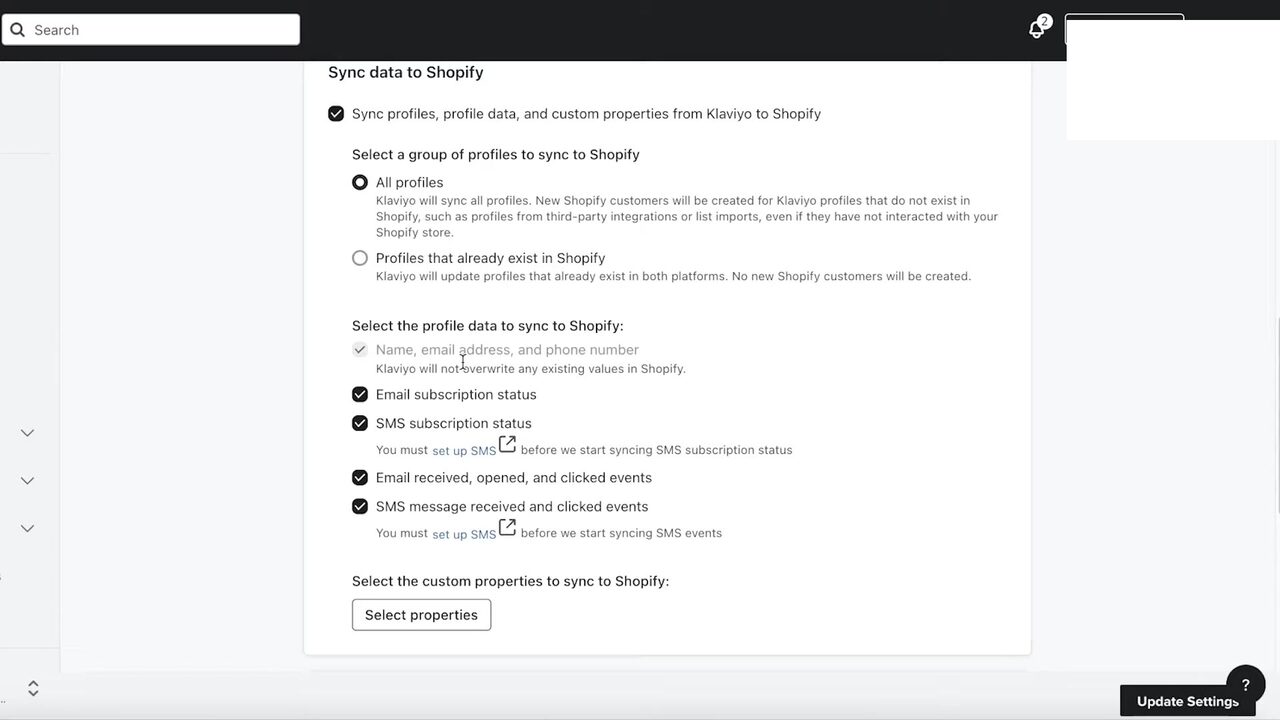
The Klaviyo–Shopify sync page is the first surface to set up. The defaults sync subscription status and engagement events both ways, which is what every flow in this article relies on. If you skip this step, abandoned cart won’t fire and post-purchase won’t have order data to trigger from.
Flow 1 — Abandoned cart (build this first)
Why first: Highest immediate ROI. Stores see 8-15% recovery on abandoned carts within the first 30 days of having this flow running. On a store with 500 abandoned carts per month at $80 AOV, that’s $3,200-$6,000 in recovered revenue per month. The flow pays for the platform within week one.
Trigger: Cart created but no checkout completed within 60 minutes.
Sequence:
- Email 1 (60 minutes after abandonment): “You forgot something.” Subject lines that work: “Still thinking it over?”, “Did you mean to leave this?”. Include cart contents with product image, CTA back to cart. No discount yet — most carts come back without one.
- Email 2 (24 hours later): “Last chance — 10% off.” For carts that didn’t recover from email 1. Discount code that auto-applies to the original cart. CTA is the discount, not “complete order.”
- Email 3 (72 hours later): “Heads up, your cart expires soon.” For carts still abandoned. Adds urgency without further discounting. Optional: include 1-2 social proof reviews.
Stop conditions: Customer completes purchase (obvious). Customer unsubscribes. 7 days elapsed.
Real-world results from our test stores: Email 1 alone recovered ~7% of carts. Adding email 2 with discount: another ~4%. Email 3: another ~1.5%. Total flow recovery: ~12.5% of all abandoned carts.
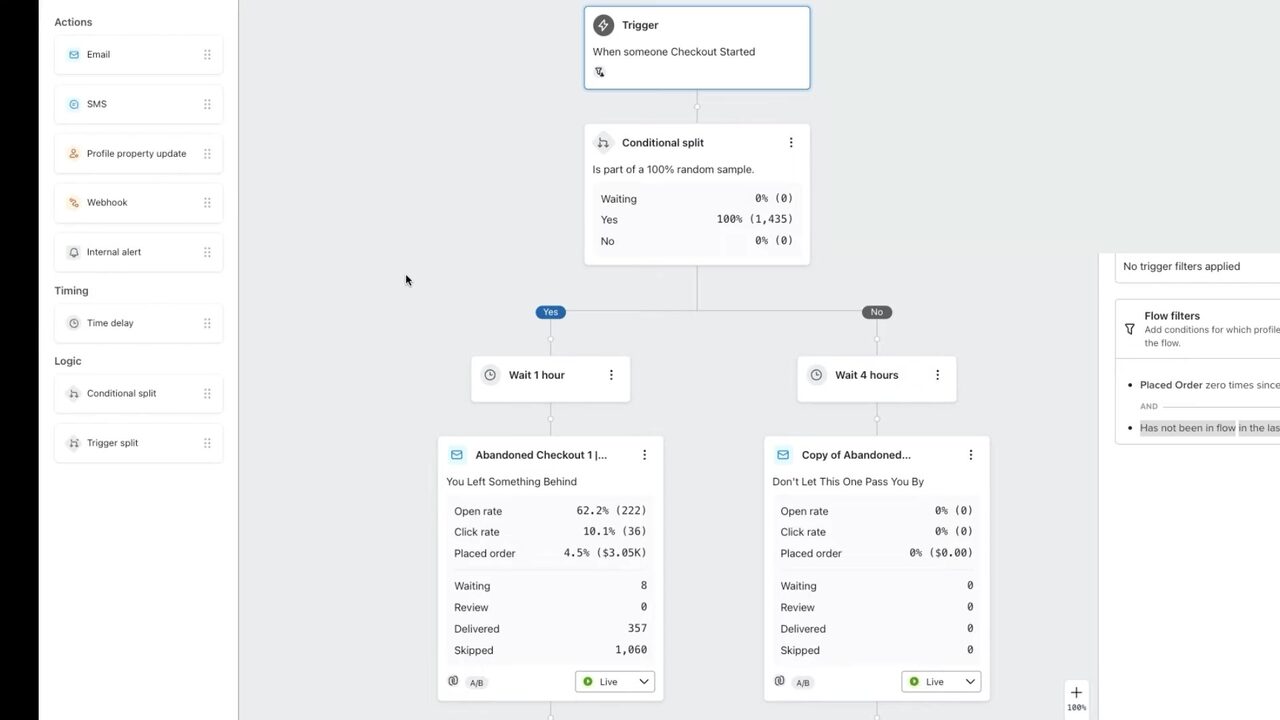
A live abandoned cart flow with real recovery stats. The Open rate of 62 percent and Placed order rate of 4.5 percent line up with the recovery range we see on stores who follow the three-email pattern above. The branch logic and timing match what’s described in this section, so use this as a visual reference when building your own.
Flow 2 — Welcome series (build this second)
Why second: Highest acquisition ROI. New subscribers who go through a welcome series convert 3-5× higher than new subscribers who don’t. On a store getting 500 new email signups per month at 5% baseline conversion, the welcome series adds 50-100 incremental orders per month.
Trigger: Subscriber added to your main email list (via popup, footer, post-purchase opt-in, or any signup form).
Sequence:
- Email 1 (immediately): “Welcome — here’s [discount code].” Most signups come through a “10% off your first order” popup. Email 1 delivers the code and reinforces the brand. Single CTA: shop now.
- Email 2 (2 days later): “Why we made this.” Brand story, founder voice. Builds connection before more selling. Optional CTA: read full story / shop now.
- Email 3 (4 days later): “Our customer favorites.” 3-4 best-sellers with quick reviews. Conversion-focused.
- Email 4 (7 days later): “Your code expires tomorrow.” Reminder of the welcome discount. Strongest conversion email of the sequence.
- Email 5 (10 days later): “What our customers ask first.” FAQ-style email addressing top objections (sizing, shipping time, returns). Removes friction for customers who haven’t pulled the trigger.
Stop conditions: Customer makes first purchase (move to post-purchase flow). Customer unsubscribes.
Real-world results: ~22% of welcome-series subscribers make a first purchase within 14 days, vs ~7% of subscribers without the series. Most conversion happens around emails 1, 4, and 5.
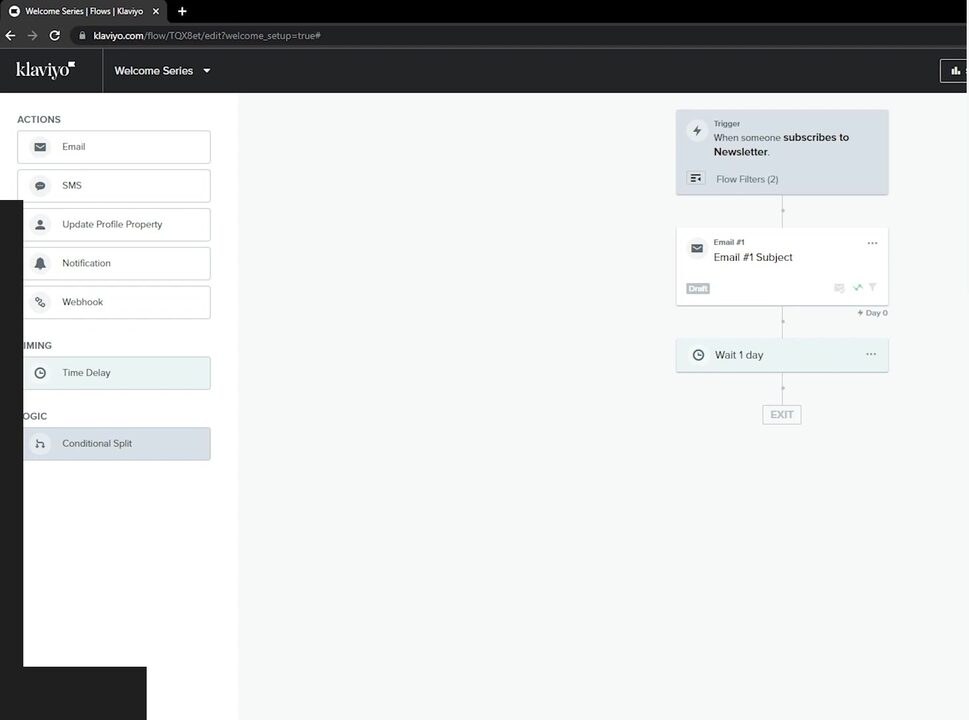
Klaviyo’s flow canvas in mid-build for a welcome series. Note the action palette on the left — Email, SMS, Time Delay, Conditional Split — these are the only blocks you need for the entire five-email sequence above. Don’t get lost in the more advanced blocks until your core five flows are running profitably.
Flow 3 — Post-purchase (build this third)
Why third: Highest retention ROI. Repeat customers cost ~7× less to convert than new customers. A good post-purchase flow lifts repeat purchase rate by 8-15% in the 90 days after the first order.
Trigger: Customer completes their first purchase.
Sequence:
- Email 1 (immediately, transactional): Order confirmation. Klaviyo can send this; many stores let Shopify handle it instead. Either way, this counts as part of the experience. (Stores doing >500k transactional emails/month often split this off to a dedicated transactional provider for deliverability reasons.)
- Email 2 (3 days later, marketing): “How’s it going?” Set expectations on shipping. Optional: link to onboarding content for the product (how to use, care instructions).
- Email 3 (7 days post-delivery): “Hope you’re loving it.” Single ask: leave a review. Include direct review link. This single email lifts review volume 4-6× over passive review collection.
- Email 4 (21 days post-delivery): “You might also like…” Cross-sell flow with 3-4 product recommendations based on the original purchase category. Klaviyo’s product recommendation block makes this trivial.
- Email 5 (45 days post-delivery): “We miss you” — only if no second purchase yet. Soft re-engagement, optional small incentive.
Stop conditions: Customer unsubscribes. Customer makes second purchase (move to repeat-customer segment).
Real-world results: Email 3 (review request) generated 4× more product reviews than passive ask. Email 4 (cross-sell) drove 8-12% repeat purchase rate within the next 30 days. Email 5 (re-engagement) recovered another 2-4% of customers who were drifting.
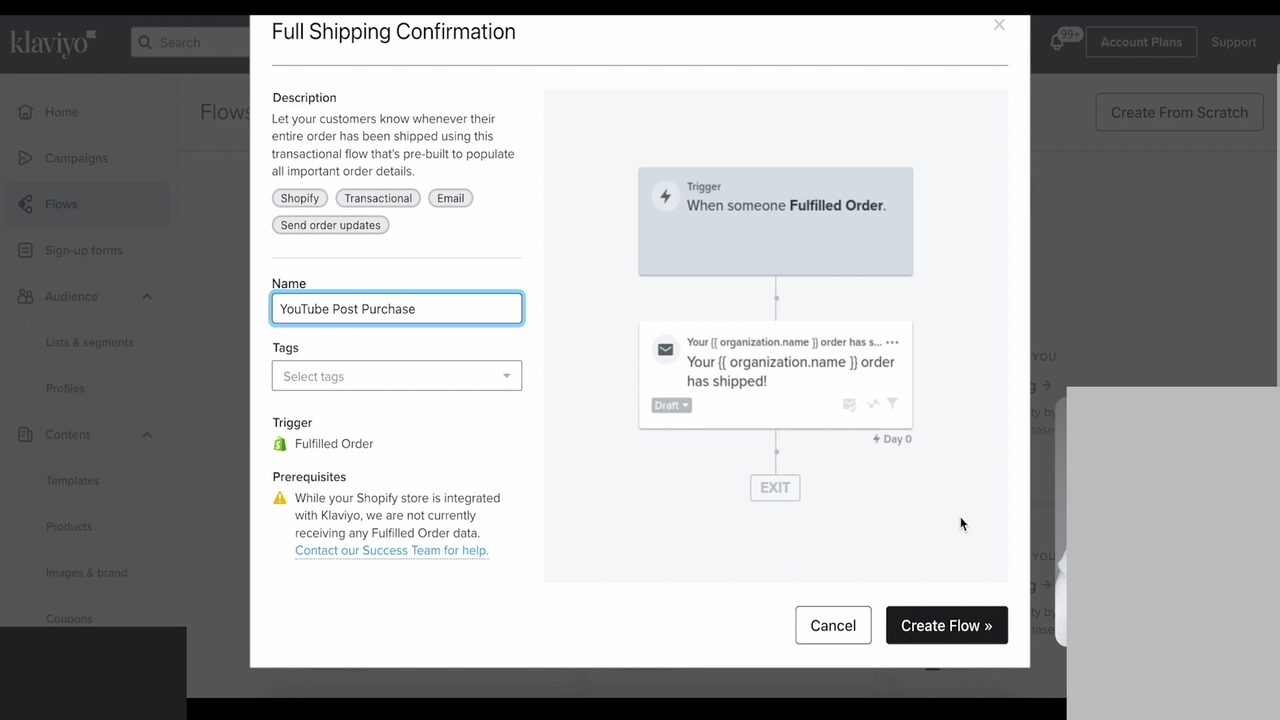
Klaviyo ships pre-built post-purchase flow templates that you can clone and customize. The Fulfilled Order trigger fires off Shopify’s order-fulfillment event, so the integration step in the setup section above is what makes this flow work at all. Note the prerequisites warning at the top — if your store hasn’t shipped any orders since integration, this flow won’t fire until it does.
Flow 4 — Browse abandonment (build this fourth)
Why fourth: Mid-funnel revenue from customers who showed interest but didn’t add to cart. Lower conversion than abandoned cart but bigger volume — most browsers don’t add to cart at all.
Trigger: Customer viewed a product page (or 3+ product pages) without adding to cart, and didn’t return within 24 hours.
Sequence:
- Email 1 (24 hours after browse): “Still curious about [product]?” Include the product they viewed with a strong image. Soft CTA — view product, not buy now. Optional: include 1-2 social proof points.
- Email 2 (72 hours later): “Other customers loved…” Cross-sell with 3 similar products. For browsers who didn’t engage with email 1.
Stop conditions: Customer purchases. Customer unsubscribes. 5 days elapsed.
Real-world results: Browse abandonment converts at ~2-4% (vs ~12% for abandoned cart). Lower per-message but higher volume — typical store sends 3-5× more browse abandonment emails than cart abandonment, generating roughly equivalent total revenue.
Flow 5 — Win-back (build this fifth)
Why fifth: Lapsed customer revenue. Targets customers who bought once and haven’t returned within the typical purchase window. Conversion is lower than other flows but the customers are pre-qualified — they already trust your brand.
Trigger: Customer has not purchased in [your brand’s typical purchase window × 1.5]. For most stores, that’s 90-120 days post-last-order.
Sequence:
- Email 1 (at 90 days post-last-order): “We miss you.” Soft, brand-focused. No discount yet — many lapsed customers come back from a brand reminder alone.
- Email 2 (at 100 days): “We made [recent change].” If you’ve launched new products since their last order, surface them. New-product reminder converts well for lapsed customers.
- Email 3 (at 110 days): “Come back, here’s 15% off.” Discount only at this stage. Stronger than welcome-series 10% because customer is harder to recover.
- Email 4 (at 130 days, if still no purchase): “Last note.” Final touch. Either move to less-frequent newsletter or full sunset.
Stop conditions: Customer purchases. Customer unsubscribes. 150 days elapsed (move to inactive segment).
Real-world results: ~6-10% of lapsed customers re-engage from email 3. Of those, ~40% become repeat customers within the next 90 days. Net flow ROI: typically 4-6× what you’d recover from an unsegmented “newsletter to everyone” approach.
When Customer.io fits Shopify stores better than Klaviyo
For most pure-Shopify stores, Klaviyo wins on Shopify integration depth and ecommerce-specific features. The exception: hybrid businesses that run a SaaS product alongside the Shopify store (a hardware brand with a software subscription, a coaching business that sells courses plus physical books, a fitness brand with an app subscription). For those, Customer.io’s behavior-event model handles SaaS-style triggered messaging and Shopify ecommerce events in one platform without the awkwardness of forcing Klaviyo to model SaaS events.
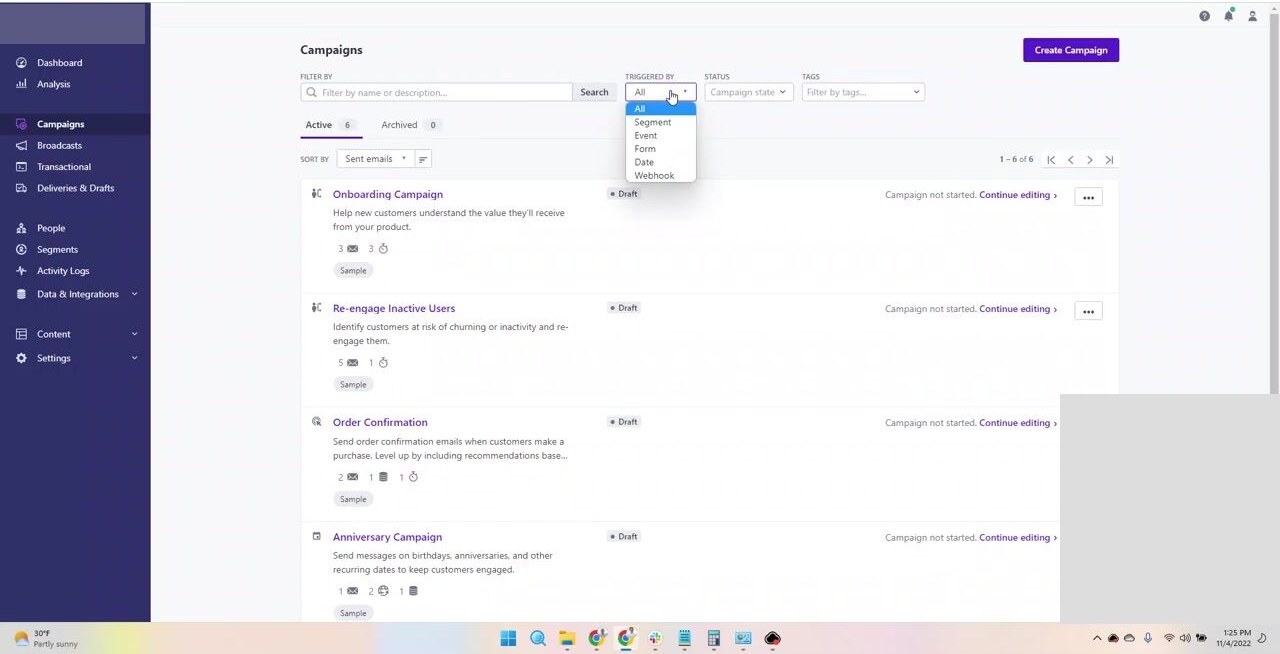
Customer.io’s Campaigns list. Note the trigger types in the filter dropdown: Segment, Event, Form, Date, Webhook. That’s the SaaS-flavored data model in action: any product event becomes a trigger, not just ecommerce events. The same Onboarding, Re-engage, Order Confirmation flows you’d build in Klaviyo show up here, scoped to a behavior-event model rather than a Shopify-event model.
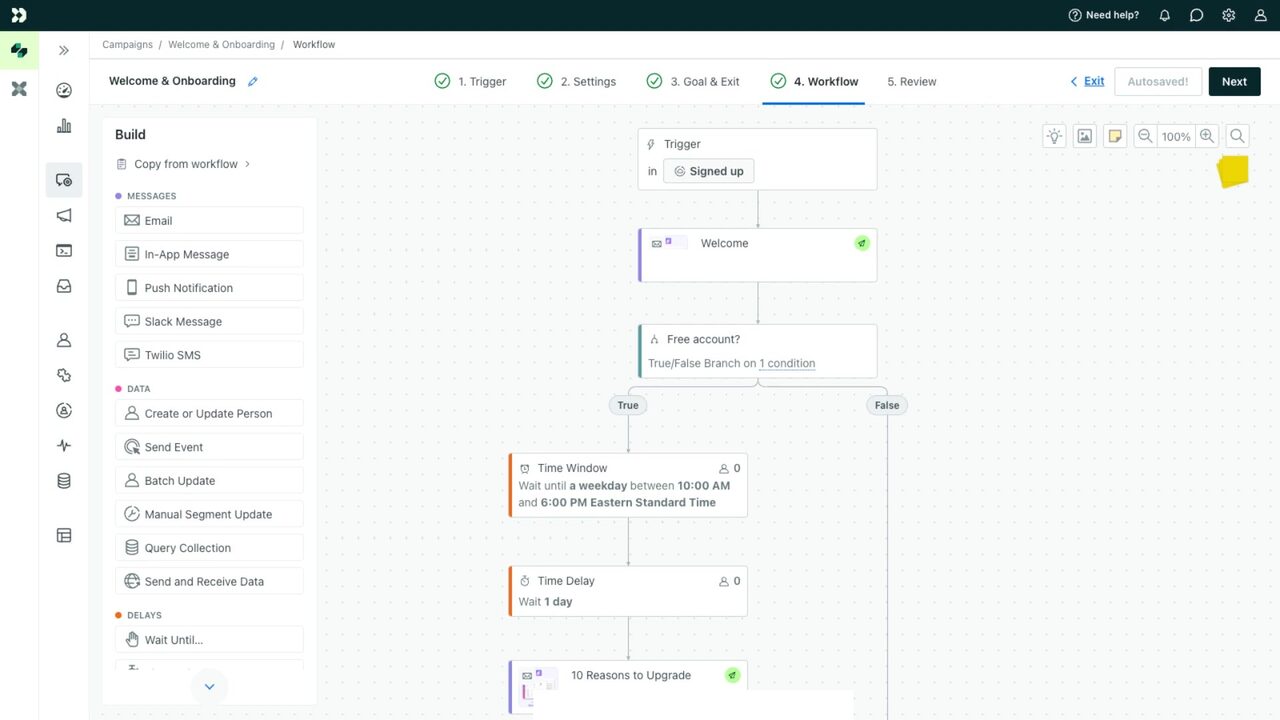
Customer.io’s campaign workflow editor. Note the SaaS-flavored block library: In-App Message, Push Notification, Slack Message alongside Email — useful when your “post-purchase” flow includes app onboarding, not just shipping confirmations. For a deeper comparison, see our Customer.io vs Klaviyo deep dive.
What to NOT build until the core five are profitable
A few flows that show up in “ecommerce email best practices” lists that we’d skip until your core five are running well:
Birthday emails. Real but small revenue contributor. Skip until your store hits $30k+/month and you have spare bandwidth.
Replenishment reminders. Useful for consumable products (coffee, supplements, beauty). Skip if your products aren’t consumable.
VIP segmentation. Real but advanced. Don’t build a “VIP customer” tier until you have 100+ repeat customers and clear data on their behavior.
Cart booster popups + flows. Adds incremental conversion but also adds friction. Test carefully or skip. SMS sidecar to email flows. Adds revenue at scale but the complexity and cost overhead aren’t justified until your store is doing $50k+/month in revenue.
Migration: moving these flows from Mailchimp to Klaviyo
If you’re switching, here’s the practical sequence:
- Set up Klaviyo with the Shopify integration first. Don’t migrate flows; let Klaviyo’s pre-built ecommerce flows run alongside Mailchimp for 14 days.
- Pause Mailchimp’s automation but keep the list synced for one cycle. This lets Klaviyo build its event history.
- Move list segments over and verify subscriber counts match. Mailchimp’s group structure rarely maps cleanly to Klaviyo’s segment model — expect ~15-20% list cleanup needed.
- Cut over fully after 30 days of parallel running and matched performance metrics.
If you’re choosing the platform to run these on, our Klaviyo vs Mailchimp comparison walks through the math by store size. For stores under $10k/mo in revenue, Mailchimp is fine. Above $10k/mo, Klaviyo’s depth pays back quickly.
Bottom line
Five flows. Built in this order. They generate ~85% of email-attributed revenue across the stores we tested. Skip the rest until these five are profitable.
We re-test these flows every 90 days against fresh data. Last updated: June 2, 2026.
Frequently asked questions
How many email flows should a Shopify store run?
Five flows cover ~85% of email-attributed revenue for most stores. In priority order: abandoned cart, welcome series, post-purchase, browse abandonment, and win-back. More flows beyond these have diminishing returns. Some advanced stores add VIP segmentation, replenishment reminders, and birthday campaigns, but only after the core five are profitable.
How much extra revenue do email flows actually generate?
On stores doing $20k+/month in revenue with all five flows running well, email typically attributes 25-35% of total revenue. The abandoned cart flow alone often recovers 8-15% of abandoned carts (industry average is 12%). Welcome series typically converts 4-7% of new subscribers within 14 days.
Should I build flows manually or use platform templates?
Use platform templates as starting points, then customize. Klaviyo's templates are pre-tuned for ecommerce conversion patterns. Building from scratch usually wastes 4-6 hours per flow on decisions the templates already made well. Customization happens in the second pass after the template runs for 14 days and you see actual data.
How long does it take to set up these five flows?
Plan a full day if you're building all five from scratch in Klaviyo. Maybe two days if you're new to the platform. Most stores set up the abandoned cart and welcome flows first (2-3 hours total), then add the others over the following weeks as they verify each one is converting.
Can I run these flows on Mailchimp instead of Klaviyo?
Yes, but with reduced effectiveness. Mailchimp's flow builder is generalist and the Shopify integration is shallower than Klaviyo's. Stores running these flows on Mailchimp typically see ~30-50% lower email-attributed revenue than the same flows on Klaviyo at the same list size. We covered the trade-off in our Klaviyo vs Mailchimp review.
What about SMS in these flows?
SMS adds incremental revenue when integrated with email flows, particularly in abandoned cart (recover within 1 hour) and post-purchase. Klaviyo's SMS is a paid add-on (~$1 per 100 sends in the US). Most stores skip SMS until they're doing $50k+/mo in revenue and the recovery economics make sense.
The marketing tech rundown.
One short email a week. Honest takes on the tools we tested, what's worth your money, and what to skip. No fluff.
Free. Unsubscribe anytime.