pillar
CRM Software in 2026: The Complete Guide for Small Businesses
The pillar guide to CRM software for small teams and agencies. Which tool fits which business model, what you'll pay, and the seven decisions that matter.
 By Manu A. · · 16 min read ·
Updated
By Manu A. · · 16 min read ·
Updated 
This is the pillar guide to CRM software for small businesses in 2026. If you’ve Googled “best CRM” and ended up bouncing between affiliate listicles that recommend Salesforce to a 3-person business, this page is meant to be the antidote: the framework for choosing the right tool, the actual stacks we recommend at each business stage, and the deeper articles for each specific situation.
Reading this end-to-end takes about 12 minutes. If you only have 30 seconds, skip to the stack recommendations by business model.
The state of CRM software in 2026
Three shifts since 2022 matter for small businesses:
HubSpot’s free tier got genuinely competitive. HubSpot Free CRM is now usable as a long-term solution for most small businesses, not just a freemium hook. Unlimited contacts, unlimited users, real deal pipelines. The constraint isn’t “free is too restrictive” — it’s “do I want HubSpot’s specific opinion on how to organize sales work?”
Founder-led CRMs took share. Tools like Folk, Attio, and Clay positioned themselves as “modern CRMs for the way founders actually work” — flexible data models, AI-assisted enrichment, less rigid pipeline opinions. They’ve been pulling small-team customers off HubSpot and Pipedrive.
Salesforce stopped being a default. Five years ago “should I use Salesforce” was the implicit small-business question. In 2026 most small businesses ask “should I use HubSpot or one of the modern alternatives” — Salesforce isn’t even in the consideration set until you cross ~50 FTE.
The decision today isn’t “which generic CRM” — it’s “which CRM model fits how I actually work.”
Stack recommendations by business model
Six common situations covering most readers:
| Situation | Use… | Cost at 5 users |
|---|---|---|
| B2B sales team, structured pipeline | HubSpot Free → Sales Hub | $0 → $90 |
| Solo founder / consultant | Pipedrive or Folk | $75-100 |
| Marketing agency managing clients | HubSpot Free CRM or Folk | $0-100 |
| SaaS company, event-driven CRM | Attio | $146 |
| Project-driven service business | Monday CRM | $60-150 |
| Tightest budget, real pipeline | HubSpot Free CRM | $0 forever |
Or skip the table — answer 3 questions and we’ll match you to one:
Which CRM fits your business?
Three questions, one recommendation. We score against the priorities you set — not affiliate commission rates.
HubSpot Free CRM is the default recommendation for businesses that don’t fit a more specific situation. It’s the tool we’d hand a friend who asked “just give me one answer.” We covered the deeper trade-offs in our HubSpot vs Salesforce comparison.
The seven decisions that determine the right CRM
Working through these in order will lead you to the right tool faster than any “Top 10” listicle.
1. What’s your business model?
The single most important question. Different business models need different data shapes.
- B2B sales with deals moving through pipeline stages → HubSpot, Pipedrive, Close, Salesforce (at scale).
- Agency managing client relationships and project lifecycles → HubSpot, Folk, Monday CRM.
- Founder-led with relationships across investors, customers, advisors, partners → Folk, Attio, HubSpot Free.
- SaaS with usage-based customer relationships → Attio, HubSpot, custom on top of your product database.
- Service business with recurring projects → Monday CRM, HubSpot, Pipedrive.
Picking the wrong category here costs months of forcing data into a model the platform doesn’t natively understand.
2. How many seats do you actually need?
Pricing scales per-user on most CRMs. Be specific about who actually uses it:
- 1-2 users: Almost any tool works. Don’t overthink.
- 3-10 users: HubSpot Free is competitive with paid alternatives.
- 10-25 users: HubSpot Sales Hub Pro, Pipedrive, or Close starts to justify the cost.
- 25+ users: Enterprise-tier conversations start. HubSpot Enterprise, Salesforce Professional, or Close at higher tiers.
Most small businesses overestimate seats. The CRM only needs seats for people actively using it — not your whole team.
3. Do you have a dedicated admin?
The single biggest predictor of “should I use Salesforce or something simpler.”
- No dedicated admin → HubSpot, Pipedrive, Folk, Attio. Tools that work out of the box.
- Yes, dedicated admin or ops person → Salesforce becomes viable. Without an admin, Salesforce is a money pit.
- Part-time admin (founder doing it themselves) → HubSpot Sales Hub Pro at most.
Salesforce’s flexibility requires real admin work to capture. A small business without that role pays for power they can’t use.
4. What’s your sales cycle complexity?
- Short cycle (deals close in days/weeks) → Pipedrive, Close. Both optimized for fast pipeline movement.
- Medium cycle (1-3 months) → HubSpot, Pipedrive, Close all work.
- Long cycle (3-12 months) → HubSpot, Salesforce. Need account-level reporting and multi-stakeholder tracking.
- Very long cycle (12+ months) or enterprise → Salesforce typically.
5. Do you need marketing automation bundled?
This is where HubSpot wins or loses you depending on your needs.
- Yes, want CRM + email marketing + landing pages in one platform → HubSpot. The bundle is the value proposition.
- No, separate marketing platform is fine → Pipedrive, Close, or others. Pair with a dedicated email marketing tool from our email marketing software guide.
- Maybe — not sure yet → HubSpot Free. The marketing features are there if you want them, ignore them if you don’t.
6. What integrations do you require?
List the actual products you need to integrate with:
- Your email marketing platform
- Your accounting / billing system (Stripe, QuickBooks, Xero)
- Your communication tools (Slack, Gmail, Outlook, calendar)
- Your help desk (Zendesk, Intercom, HelpScout)
- Your storefront if applicable (Shopify, WooCommerce)
Then check the CRM’s native integration list. Native integrations are more durable than Zapier-mediated connections. HubSpot has the largest integration library; Pipedrive is solid; the modern tools (Folk, Attio) are catching up.
7. What’s your budget posture?
- Truly bootstrapped → HubSpot Free CRM. It’s genuinely free, not a trial.
- $50/month maximum → Pipedrive Essential, Folk Pro tier.
- $200-500/month range → HubSpot Sales Hub Pro, Close, Monday CRM.
- $1,000+/month with complex needs → HubSpot Enterprise, Salesforce, or specialized industry CRMs.
The CRMs by category, one paragraph each
Default for most small businesses
HubSpot Free CRM + Sales Hub. The default we recommend. Free tier covers most small businesses for 12-18 months. Upgrade to Sales Hub Starter ($15/user/month) when you need automation, or Sales Hub Pro ($90/user/month) when you need full pipeline reporting. Detailed HubSpot vs Salesforce comparison.
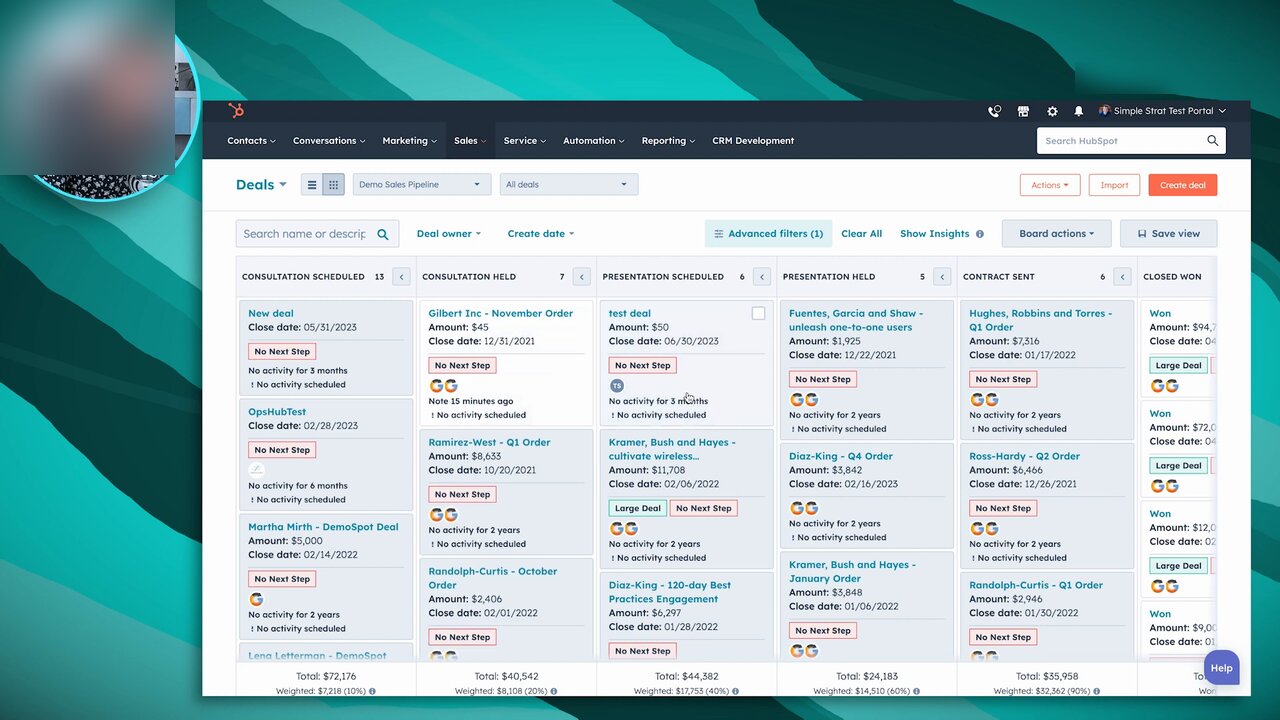
The Deals board is the most-used surface in HubSpot’s free tier. Six stage columns with per-stage totals and weighted forecasts is what 80 percent of small-business HubSpot use looks like in the first month.
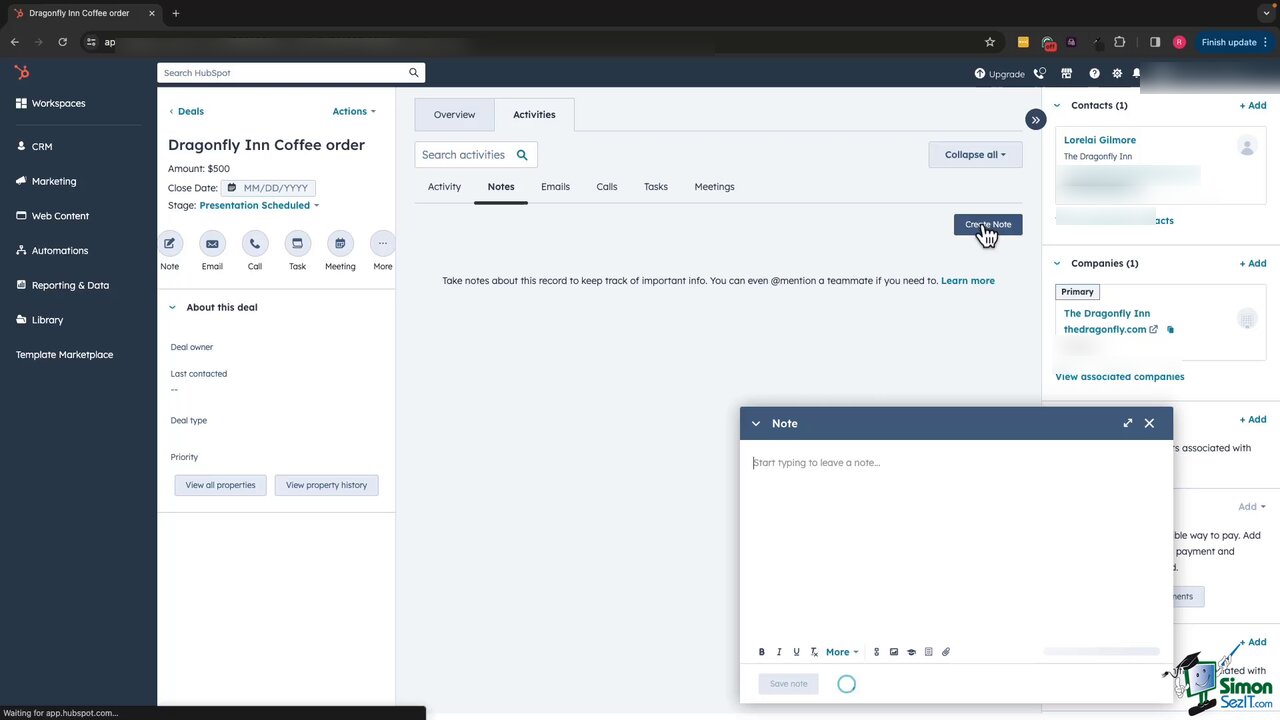
The deal detail view is where HubSpot earns its place at the top of this list. Activity feed (notes, emails, calls, tasks, meetings) plus contact and company association in a single page is what HubSpot does better than any other free CRM at this scale.
B2B sales focus
Pipedrive ($15-99/user/month). Pipeline-first CRM optimized for deals moving through stages. Cleaner UI than HubSpot for sales-only teams. Less marketing automation depth. Sweet spot: 3-25 user B2B sales teams.
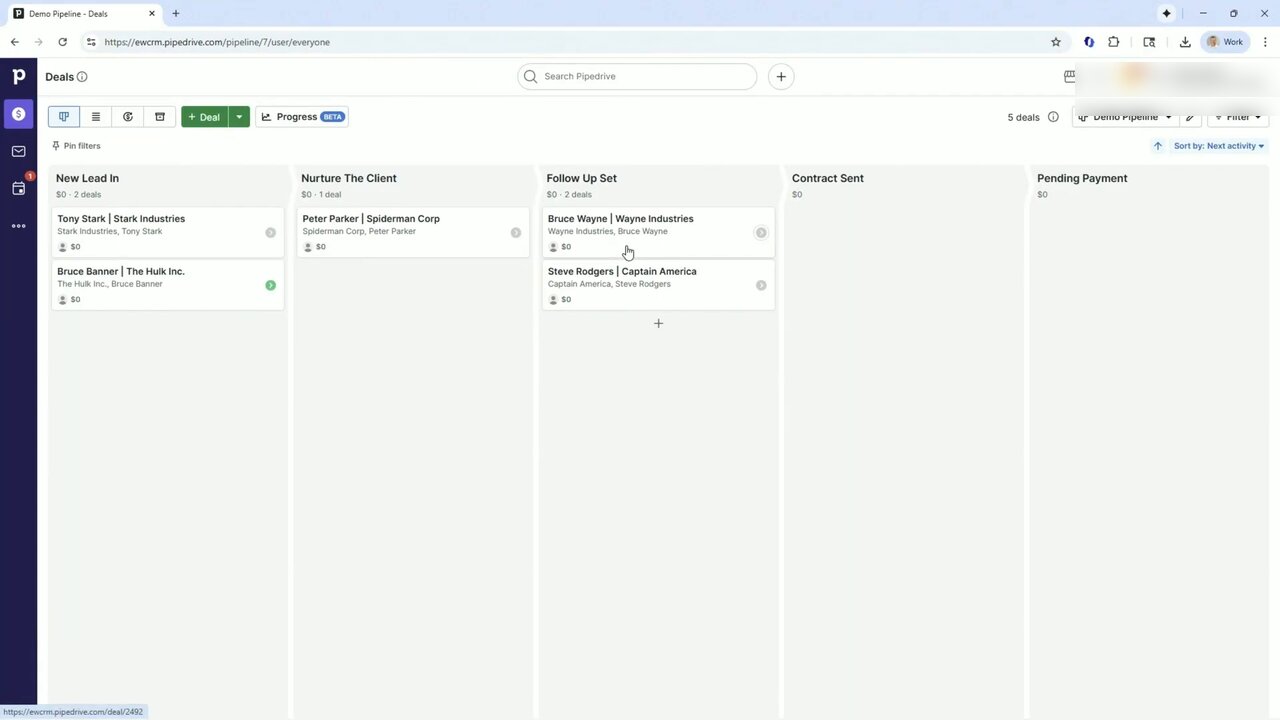
Pipedrive’s kanban is the cleanest pipeline view in the category. No marketing-automation panels, no campaigns sidebar, just deals moving through stages. This is the surface sales-only teams open every morning.
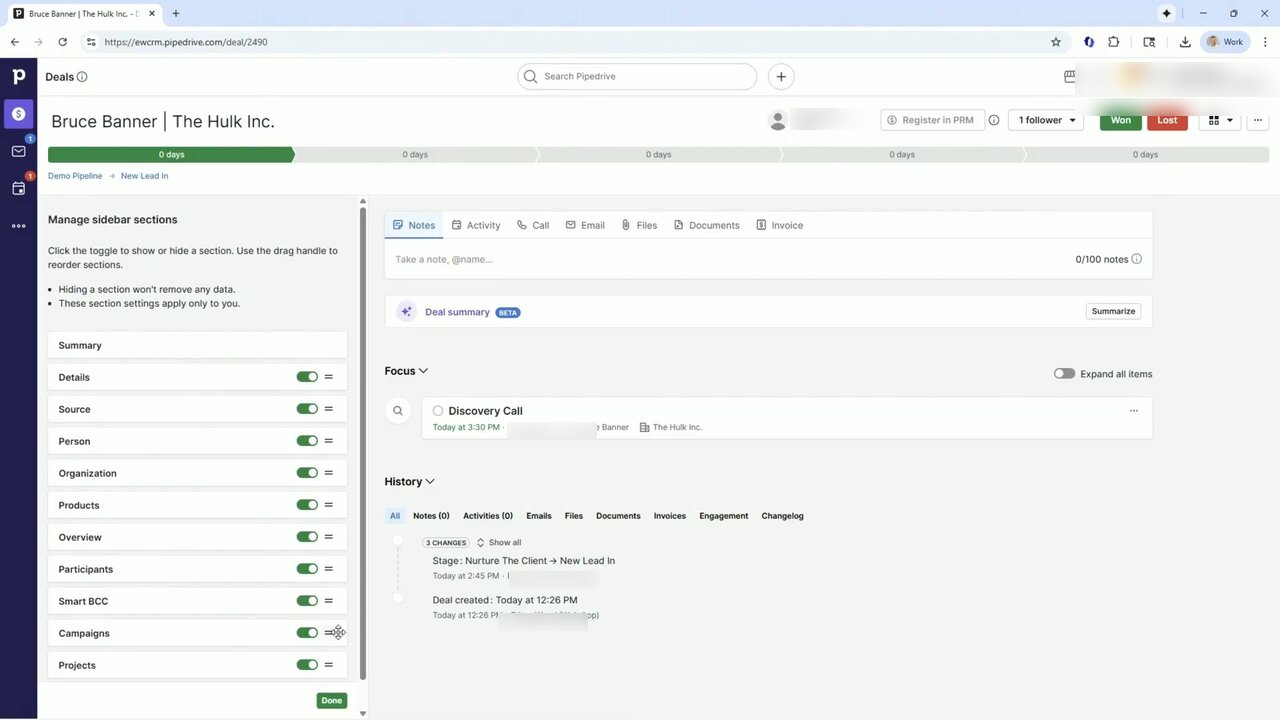
The Manage sidebar sections panel on the left is Pipedrive’s underrated feature. You toggle which info blocks render on each deal page per user, per workflow. No dev work; no Salesforce-style admin overhead.
Close ($59-129/user/month). Sales-team-focused CRM with built-in calling, SMS, and email sequencing. Strong for outbound sales teams. Smaller integration ecosystem than HubSpot or Pipedrive.
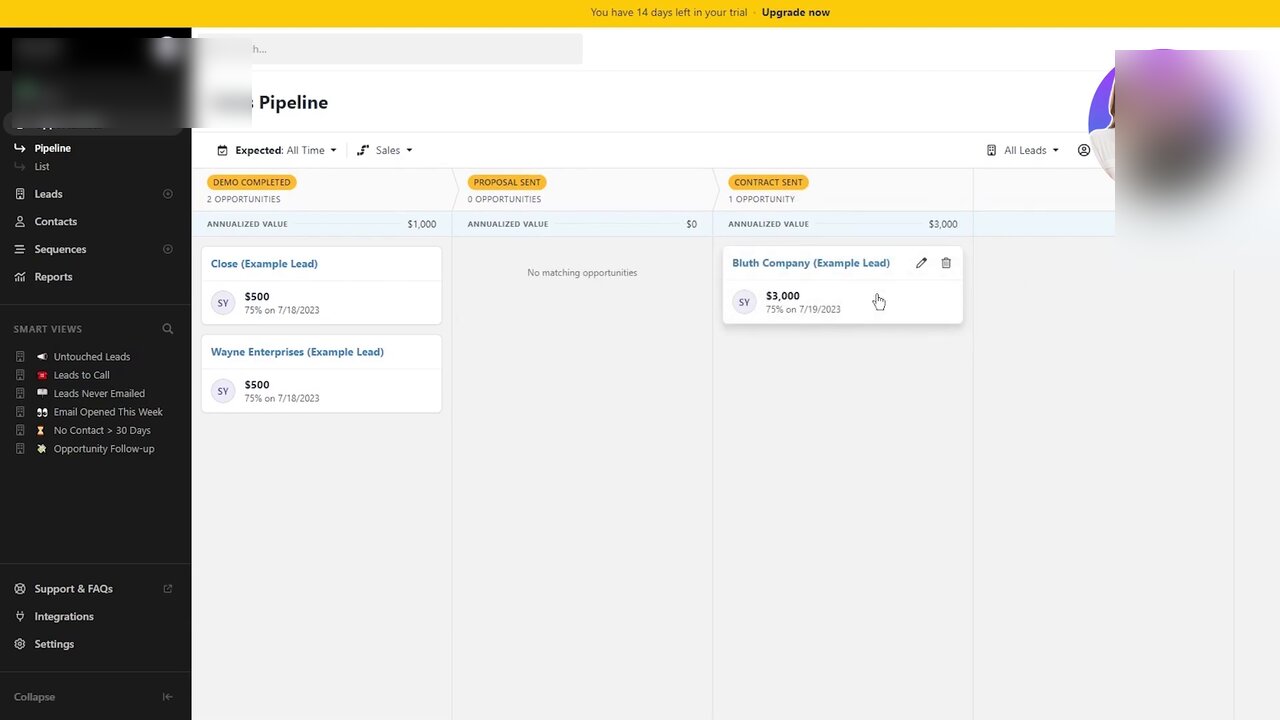
Close’s pipeline view is built for outbound sales teams where every column has a dollar figure and a probability percentage. Smart Views in the left rail (Untouched Leads, Leads Never Emailed, No Contact > 30 Days) are the working surfaces of an outbound rep’s daily workflow.
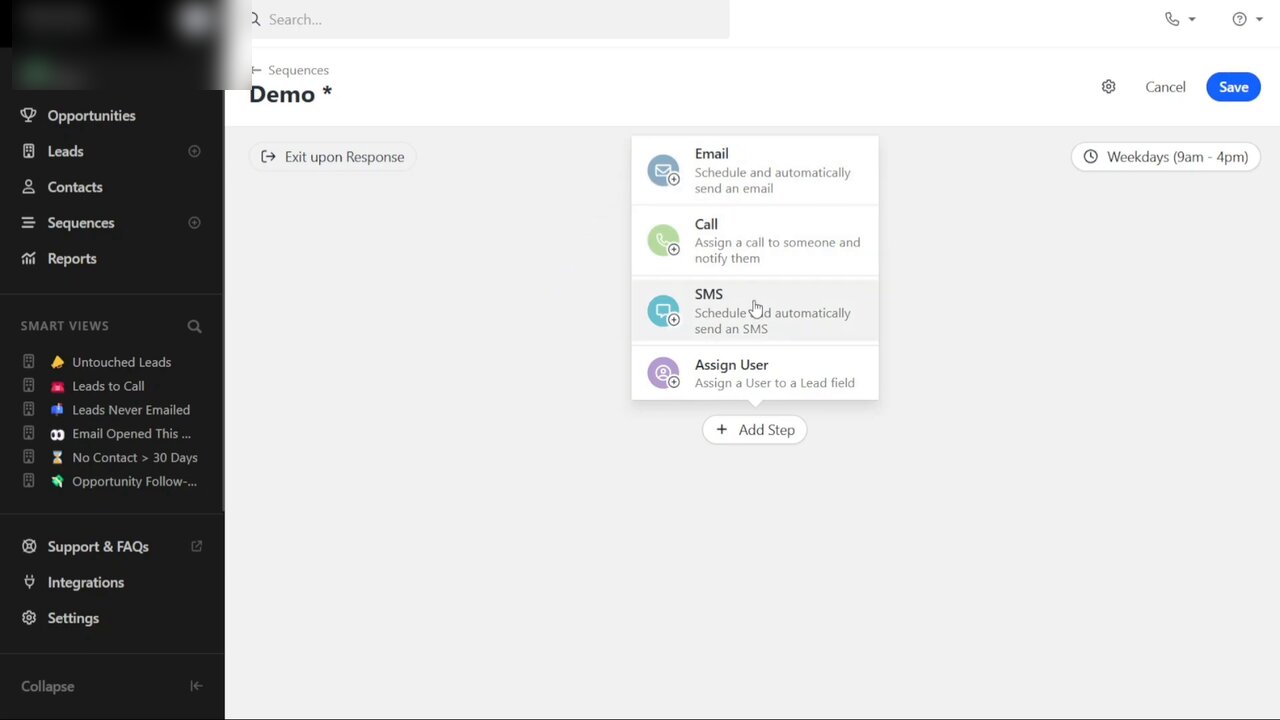
Sequences are Close’s killer feature. Email plus Call plus SMS plus Assign User in a single multi-step automation, with Exit upon Response branching built in. HubSpot charges for this at the Pro tier; Pipedrive doesn’t do it natively at all.
Founder / agency / relationship-driven
Folk ($20-50/user/month). Modern CRM with flexible data model and AI-assisted enrichment. Works as a contact manager, agency CRM, or founder pipeline tool. Smaller than HubSpot but more flexible.
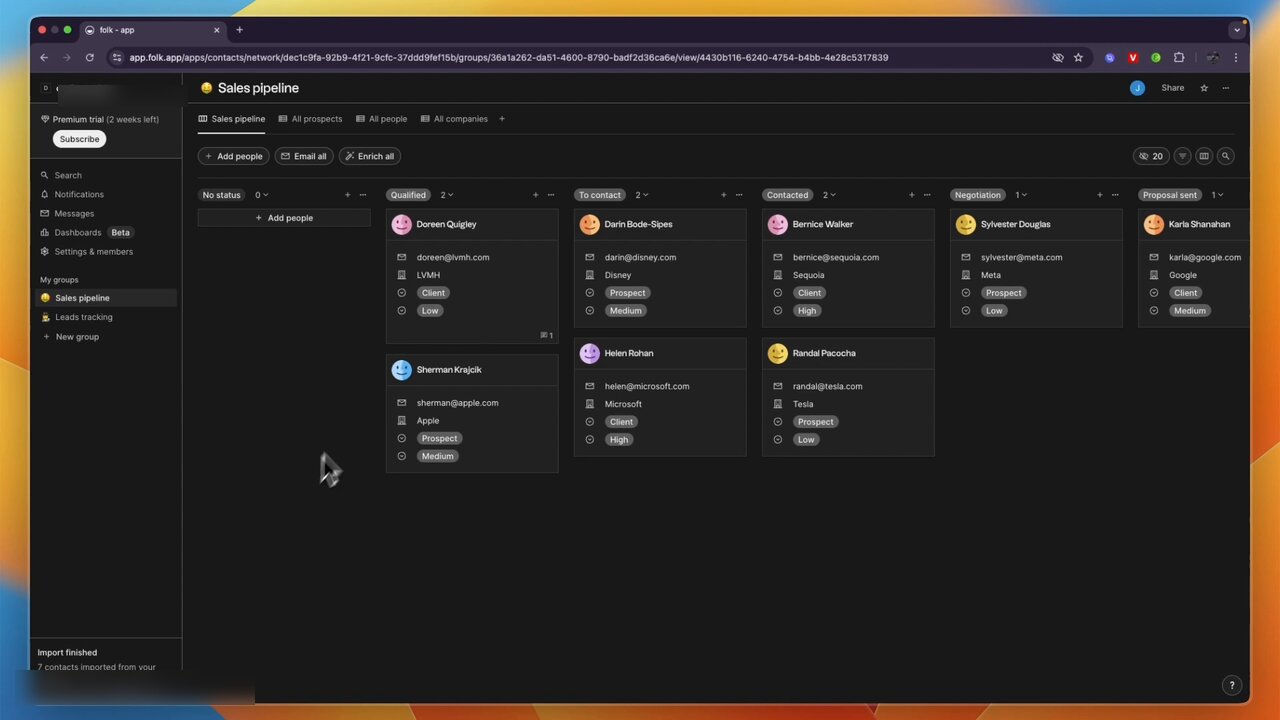
Folk’s sales pipeline is structured around relationship status and priority pills, not stage value. The framing fits agency, founder, and consulting workflows where deals are conversations not transactions.
Attio ($29-89/user/month). Notion-feeling CRM with custom data model. Best for SaaS and tech-flavored teams that want to extend the CRM into a custom workflow tool.
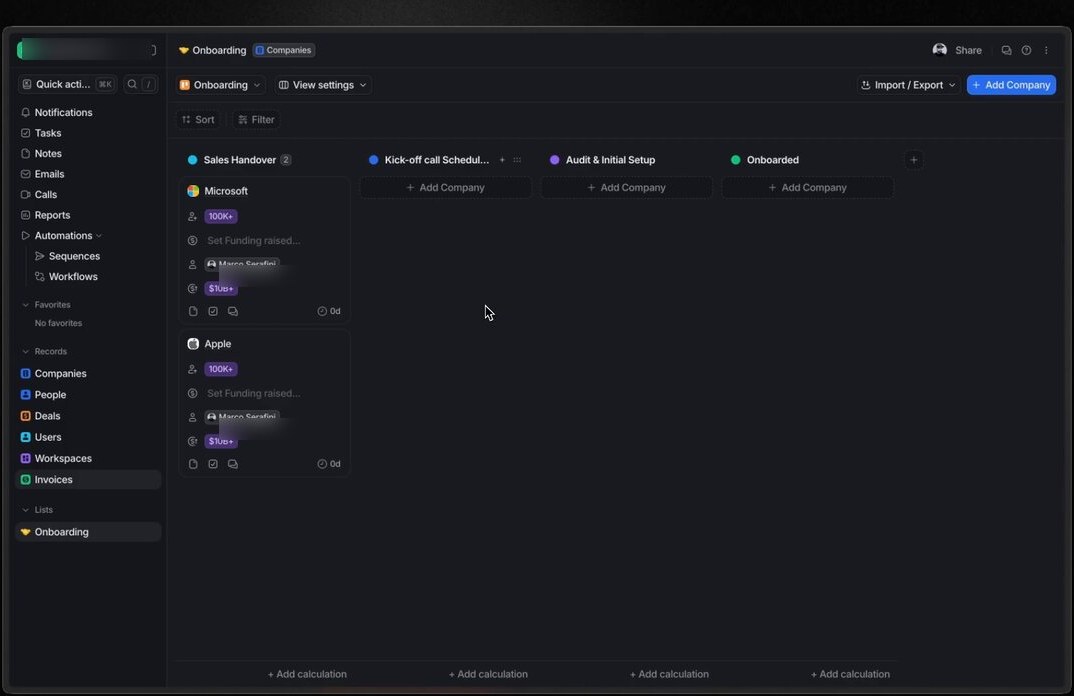
Attio’s Lists feature lets you build kanban pipelines on top of any object: companies, people, deals, custom records. Same data, different views. This is the move that makes Attio feel like Notion for CRM rather than Salesforce-lite.
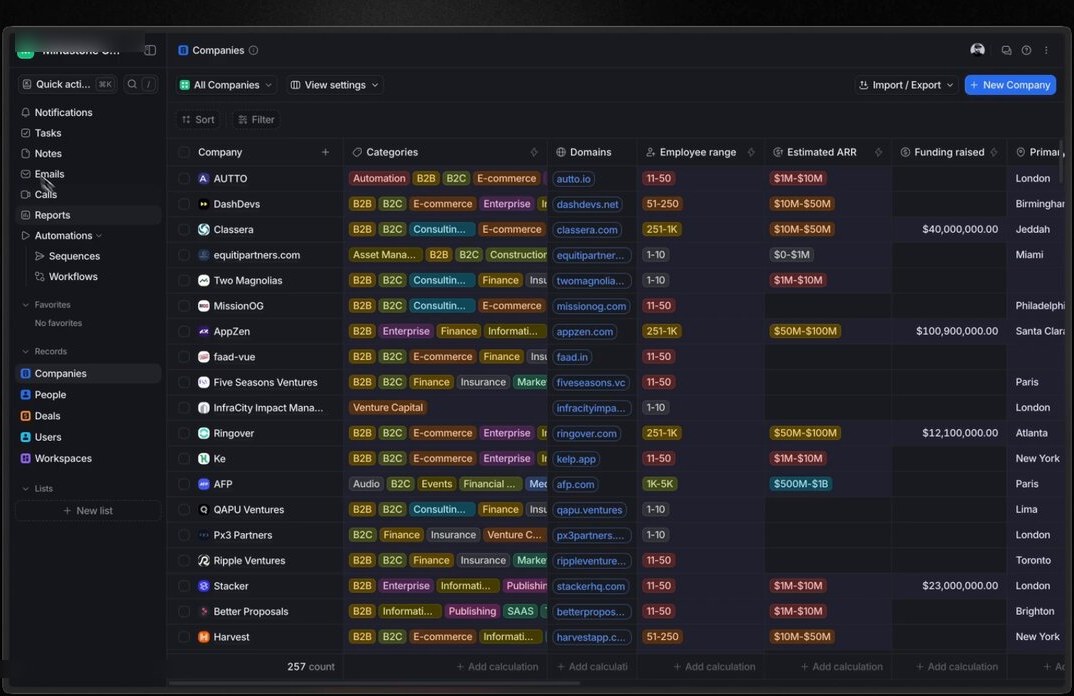
The Companies table is Attio in its element. Strong column types (tags, employee-range pills, ARR amounts, funding raised), Notion-style filtering, and the ability to switch the same data between table, kanban, or feed view in one click.
Clay ($149+/month). AI-powered prospecting and CRM hybrid. Outbound-focused. Often used alongside HubSpot rather than replacing it.
Project / service business
Monday CRM ($12-30/user/month). CRM extension of Monday’s project management product. Best for service businesses where deals are projects with stages. Strong for agencies and consultancies.
Enterprise
Salesforce ($25-300+/user/month). Industry standard for enterprise sales. Avoid for small business — overkill, expensive, and requires admin time you probably don’t have. Worth it at 50+ FTE with a dedicated admin and complex sales operations.
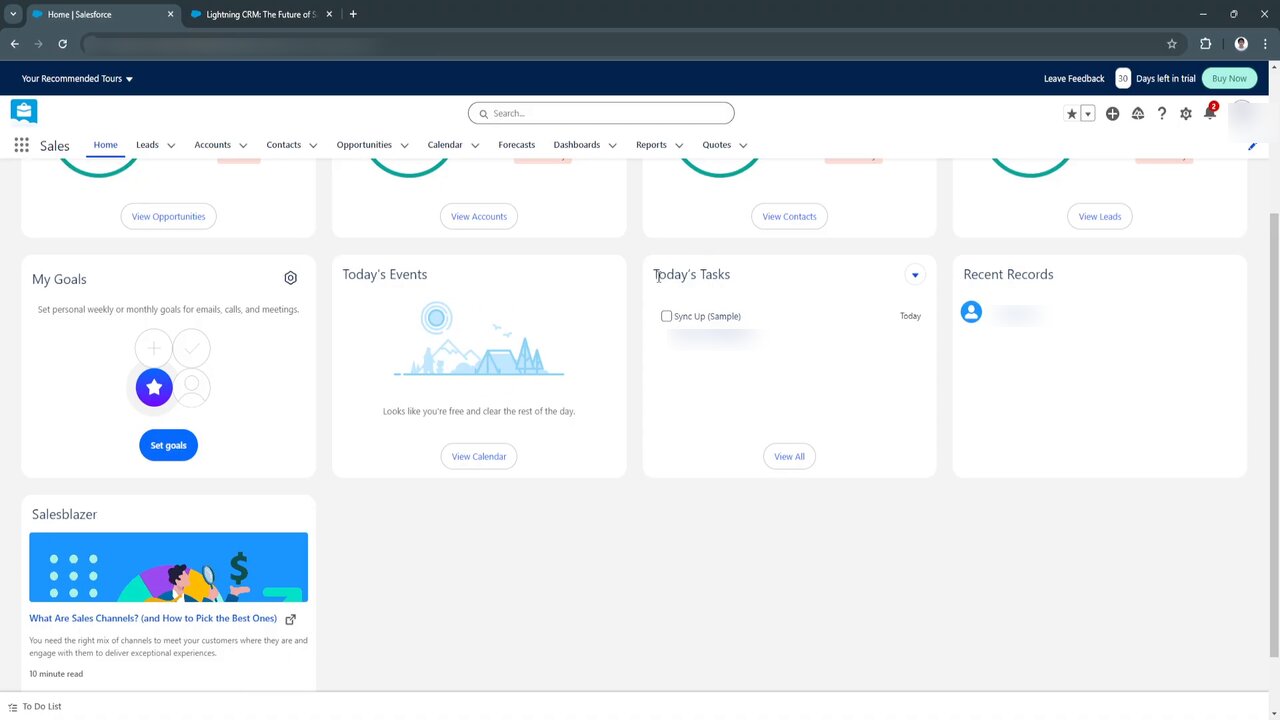
Salesforce Sales Cloud Home dashboard. The first thing every Salesforce user sees; the second is the price tag, then the implementation timeline. The depth is real and so is the reason small businesses shouldn’t run this without a dedicated admin.
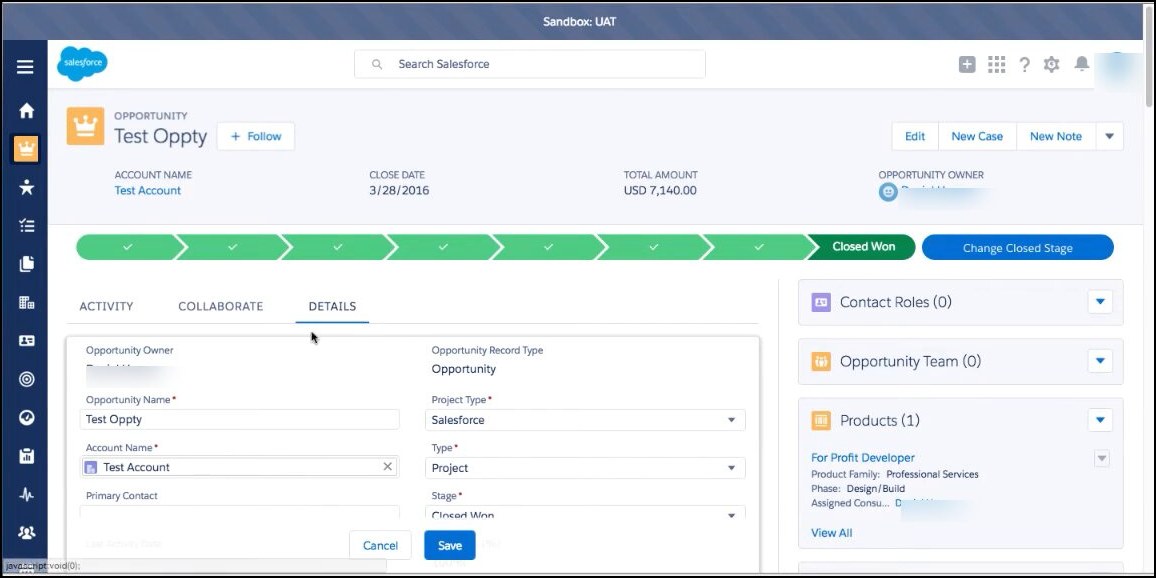
Salesforce opportunity record page. The full-stage path landing on Closed Won, plus the Contact Roles, Opportunity Team, and Products right rail, is what every enterprise sales report eventually rolls up to. Powerful and overkill at the same time, depending on your scale.
Microsoft Dynamics 365 ($65-180/user/month). Microsoft ecosystem CRM. Best for businesses already deep in Microsoft 365 + Office.
Budget options
Zoho CRM ($14-52/user/month). Bigger feature set than HubSpot Free at low cost, but UI is dated and ecosystem is fragmented. Sometimes the right answer for very specific use cases (regional integrations, industry verticals).
HubSpot Free CRM (free). Listed twice on purpose — for budget-constrained businesses, the free tier of HubSpot is the right answer 80% of the time.
What to skip
A few CRMs that show up in “Top 10” lists that we don’t recommend:
Insightly. Aging product. Smaller ecosystem. No clear use case where it beats HubSpot, Pipedrive, or Folk.
Freshsales (Freshworks CRM). Has its place in mid-market, but the small business plans are aggressively gated. HubSpot Free does more for free.
SugarCRM. Open-source heritage tool. Self-hosting complexity rarely justified for small businesses. Modern alternatives are simpler.
Migration: what to expect
Most CRM migrations come from one of three sources: spreadsheet, an old CRM, or an email platform someone’s been using as a CRM. The mechanics:
From spreadsheet to CRM. 4-6 hours. Clean the spreadsheet first (deduplicate, normalize formats), then import via CSV. Most CRMs handle this natively. The bigger work is establishing pipeline stages and data hygiene habits going forward.
From one CRM to another. 2-5 days for small teams. Export contacts, deals, notes, and activities from the old CRM. Map fields to the new CRM’s schema. Run parallel for 2-4 weeks before cutting over fully.
From email platform-as-CRM to a real CRM. 1-2 days. Most email platforms (MailerLite, Kit, Beehiiv) export contacts cleanly. The data is usually thinner than a real CRM expects (no deals, no pipeline) — you’ll be establishing those primitives in the new tool.
Most CRMs offer migration help on paid plans. HubSpot’s “free migration” team is generous; Pipedrive’s is helpful but slower; Salesforce’s requires a paid implementation partner.
Decision flow: pick the right CRM in three minutes
Work through these in order:
- Are you a B2B SaaS or tech company that wants a flexible custom data model? → Attio.
- Are you a B2B sales team focused on outbound calling and emailing? → Close.
- Are you a founder, consultant, or agency principal managing relationships across many categories? → Folk or HubSpot Free CRM.
- Are you a service business or agency where deals are projects? → Monday CRM.
- Are you a B2B with a structured sales pipeline? → HubSpot Free → Sales Hub OR Pipedrive.
- Are you under 5 users with no clear category fit? → HubSpot Free CRM is the default.
If you’ve made it through and you’re still unsure, HubSpot Free CRM is the safest default — easy to migrate away from later if you outgrow it.
What to do next
If you’re choosing between HubSpot and Salesforce specifically, our HubSpot vs Salesforce comparison walks through the head-to-head decision most growing companies face.
If you’re migrating from a spreadsheet to a CRM for the first time, plan for 4-6 hours of focused work plus 2-3 weeks of data hygiene as the new habit settles in.
For the broader stack picture (CRM + email + analytics + SEO tools), our email marketing software guide and SEO tools for small business guide cover the adjacent decisions.
We re-test platforms every 90 days. Last updated: April 23, 2026.
Frequently asked questions
What's the best CRM for small business in 2026?
There's no single best — it depends on your business model. For B2B with a sales team: HubSpot Free CRM, then HubSpot Sales Hub when you scale. For solo founders and consultants: Pipedrive or Folk. For agencies managing client relationships: HubSpot Free CRM or Folk. For SaaS companies needing event-driven CRM: Attio. For tightest budgets: HubSpot Free CRM (genuinely free forever). Avoid Salesforce until you have 50+ FTE and a dedicated admin.
Is HubSpot really free?
Yes — HubSpot Free CRM is genuinely free forever for unlimited contacts and unlimited users. The catch is feature limits: no automation beyond basic, no advanced reporting, no custom properties past a small set. Most small businesses can run on HubSpot Free for 12-18 months before needing to upgrade. The upgrade pricing scales aggressively — that's how HubSpot makes money.
Should I use Salesforce as a small business?
Almost certainly not. Salesforce is built for enterprise sales teams with dedicated CRM admins. The customization power that justifies the price is wasted on small businesses, and the maintenance overhead (admin time, consultant fees, integration costs) often exceeds the platform fee. Most companies under 50 FTE who picked Salesforce eventually wish they'd picked HubSpot.
What's the difference between a CRM and a contact manager?
A CRM manages relationships with deals, pipelines, and follow-up automation. A contact manager just stores contact information. The line has blurred — most modern CRMs can be used as contact managers, and most contact managers have added CRM features. The practical difference: if you have deals worth tracking through stages, you need a CRM. If you just need to remember who you've talked to, a contact manager (or even a spreadsheet) works.
How much does a small business CRM actually cost?
At 1-3 users: $0-50/month. HubSpot Free is genuinely free. Pipedrive starts at $15/user/month. Folk starts at $20/user/month. At 5-10 users: $100-300/month. At 20+ users with full sales operations: $500-2,000/month. Salesforce starts at $25/user/month for the basic tier and scales aggressively from there.
Do I need a CRM if I'm just starting out?
Probably not for the first 6-12 months. Until you have ~20-50 contacts you're actively following up with, a spreadsheet works. The CRM becomes valuable when you're losing track of who you've talked to, when, and what's next. If that's not happening yet, save the cognitive overhead and pick a CRM later.
How long does CRM migration take?
From spreadsheet to CRM: 4-6 hours of setup plus ongoing data hygiene. From one CRM to another: 2-5 days for small teams (under 5,000 contacts), 1-2 weeks for mid-sized teams. Most CRMs offer migration assistance on paid plans. Plan for 2-4 weeks of parallel running before fully cutting over.
The marketing tech rundown.
One short email a week. Honest takes on the tools we tested, what's worth your money, and what to skip. No fluff.
Free. Unsubscribe anytime.