comparison
HubSpot vs Salesforce for Small Business 2026: Which Wins, and When
HubSpot is the small-business default. Salesforce is the enterprise standard. We tested both for 60 days. When each wins, and the headcount that flips it.
 By Manu A. · · 13 min read ·
Updated
By Manu A. · · 13 min read ·
Updated 
The CRM decision that comes up most often at small businesses is “HubSpot or Salesforce?” — and the answer in 2026 is sharper than it used to be. Five years ago Salesforce was the assumed default once you got serious; today the assumed default at small business scale is HubSpot, and Salesforce is what you graduate into specifically if your business has grown into needing it.
We ran both platforms for 60 days at two real test environments — a 12-person B2B services firm and a 30-person SaaS company — to validate the assumption. The honest answer: HubSpot wins decisively for businesses under 50 FTE, and the FTE count where the math flips is much higher than most “Top 10 CRM” lists imply.
Quick verdict. HubSpot wins for almost every small business in 2026. The all-in-one model (CRM + Marketing Hub + Sales Hub + Service Hub) generates more revenue per dollar than Salesforce at small-business scale because HubSpot can be used out of the box; Salesforce’s power requires admin time most small businesses don’t have. Salesforce wins once you cross 50+ FTE on the sales/CS team AND have a dedicated CRM admin AND have genuinely complex operations. Without all three, Salesforce is a money pit. The wrong question is “which is better”; the right question is “do I have the operational maturity to use Salesforce profitably.”
The rest of this piece walks through the actual numbers, the migration mechanics, and the specific FTE/budget/admin-availability thresholds that flip the decision.
At a glance: how they compare for small business
| HubSpot | Salesforce | |
|---|---|---|
| Best for | Small businesses, agencies, growth-stage SaaS | Enterprise sales teams with dedicated admins |
| Free tier | Free CRM (unlimited contacts/users) | None — Starter at $25/user/mo |
| Entry paid | Starter Suite: $20/mo total | Starter: $25/user/mo |
| Mid-tier (5 users) | Sales Hub Pro: $450/mo | Professional: $400/mo |
| Scale tier (25 users) | Sales Hub Pro: $2,250/mo | Professional: $2,000/mo + implementation |
| Implementation cost | Low (DIY most of it) | $50k-200k typical at scale |
| Time to live | Days | Weeks to months |
| Marketing automation bundle | Native (Marketing Hub) | Requires Pardot or Marketing Cloud (separate, expensive) |
| Standout strength | Time-to-value, all-in-one bundle, free tier | Customization depth, enterprise integrations |
| Standout weakness | Pricing scales aggressively above 25 users | Requires dedicated admin to capture the value |
How we tested
Each platform ran for 60 days against two real test environments.
The B2B services workflow. 12-person consulting firm. Lead capture from website forms, deal pipeline with 4 stages, automated follow-up sequences, basic reporting on pipeline health. Same process on each platform.
The growth-stage SaaS workflow. 30-person company with sales (8), customer success (5), marketing (3), product/eng (rest). Sales pipeline with 6 stages, post-sale CS workflows, integration with Stripe and Slack, custom reporting for the leadership team.
Time-to-live. Stopwatch on initial setup. HubSpot’s setup wizard had us live in 4 hours; Salesforce required 18 hours of admin work plus an external implementation consultant for the SaaS workflow.
Real billing math. Modelled at 5, 15, and 50 users including platform fees, add-ons, and (for Salesforce) typical implementation costs.
We re-test every 90 days. Last updated noted at the bottom.
HubSpot — the small business default
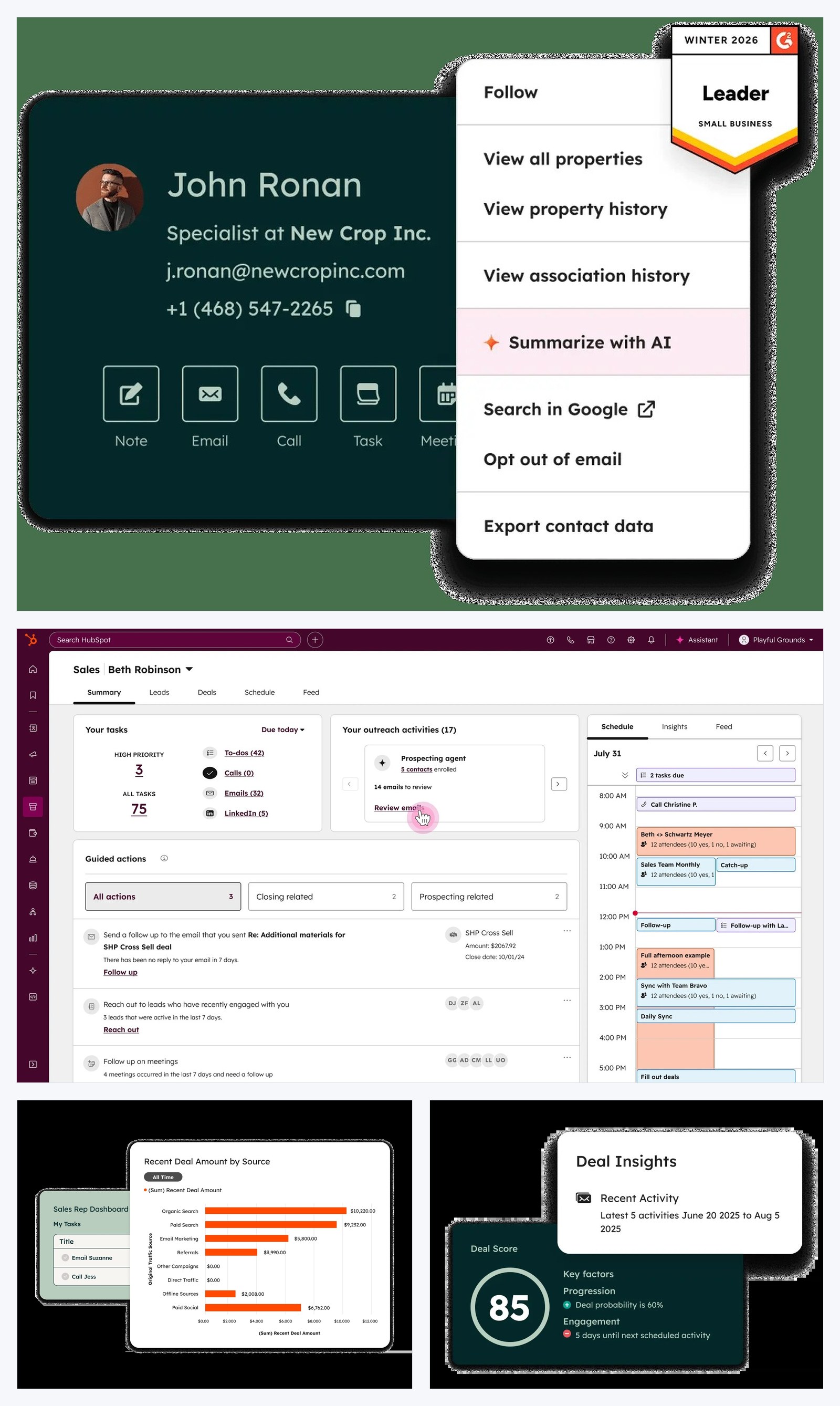
Source: HubSpot. The CRM workspace, prospecting view, and sales reporting in one composite. The kanban-style deal pipeline is what most small business teams recognize as “HubSpot CRM.”
HubSpot is the CRM most small businesses should pick in 2026. Free tier is genuinely free. Paid upgrades are aligned with capability needs as you grow. The all-in-one bundle (CRM + Marketing + Sales + Service) means one platform, one bill, one team to train.
Best for. Small businesses (5-50 FTE). Agencies managing client relationships. Growth-stage SaaS with bundled sales + marketing needs. Anyone whose primary constraint is admin time, not platform power.
Skip HubSpot if. You’re 50+ FTE with a dedicated CRM admin and genuinely complex operations — Salesforce’s flexibility starts paying back at that scale. You need very specific industry vertical features (life sciences, financial services compliance) — Salesforce’s ecosystem has more vertical-specific apps.
Pricing reality.
- Free CRM: Unlimited contacts, unlimited users, basic deal pipeline, basic reporting. Genuinely free forever.
- Starter Suite: $20/month total (not per user) — adds basic automation, removes HubSpot branding.
- Sales Hub Starter: $15/user/month — adds sequences, meeting scheduling.
- Sales Hub Professional: $90/user/month — full automation, advanced reporting, custom objects.
- Sales Hub Enterprise: $150/user/month — adds advanced permissions, predictive lead scoring.
Most small businesses live on Free CRM for 12-18 months, then upgrade to Starter Suite or Sales Hub Starter as needs grow.
Where HubSpot wins.
- Free tier is genuinely useful long-term, not just a hook
- All-in-one bundle (CRM + email marketing + landing pages + service desk) eliminates 3-4 separate vendor bills
- Time-to-value is days, not weeks
- Marketing Hub is materially better than Pardot or Marketing Cloud for small business
- Active product velocity — new features ship quarterly
- Strong integration with HubSpot’s own academy + free training resources
Where Salesforce wins (over HubSpot).
- Customization depth — if you have a genuinely unique business process, Salesforce can model it
- Industry vertical apps (FinServ, life sciences, manufacturing)
- Larger enterprise integration ecosystem
- More mature reporting at very large scale (1M+ contacts, 100+ users)
- Better at multi-team workflows where sales, CS, and field service share data
What they don’t tell you. HubSpot’s pricing scales aggressively above 25 users. At 50 users on Sales Hub Pro you’re at $4,500/month — at that point the per-user math vs Salesforce starts getting close. The difference: HubSpot is still useful out of the box at that price; Salesforce requires admin investment to extract value.
Salesforce — the enterprise standard
Salesforce is the industry standard for enterprise sales operations. It’s powerful, customizable, and battle-tested at the largest scales. It is also overkill, expensive, and admin-intensive for almost every small business — which is why “should I use Salesforce” is the wrong question for most readers of this article.
Best for. Companies with 50+ FTE on the sales/CS team. Organizations with dedicated CRM admins (not part-time). Industries with specific vertical CRM needs. Multi-team operations where sales, marketing, CS, and field service share data.
Skip Salesforce if. You’re under 50 FTE. You don’t have a dedicated admin. Your sales process is straightforward. You can’t justify $50k-200k of implementation cost on top of platform fees.
Pricing reality.
- Starter: $25/user/month — basic CRM only.
- Pro Suite: $100/user/month — added marketing tools.
- Professional: $80/user/month — full sales automation.
- Enterprise: $165/user/month — advanced customization.
- Unlimited: $330/user/month — top tier with unlimited customization.
Plus typical implementation costs: $50,000-200,000 for the initial setup at small enterprise scale. Plus ongoing admin/consultant fees: $50,000-150,000/year for serious operations.
Where Salesforce wins.
- Customization depth that other CRMs cannot match
- Vertical-specific industry apps (FSC, HSC, NPSP, etc.)
- Largest integration ecosystem
- Mature multi-team workflows
- Best-in-class at managing sales operations at very large scale (100+ reps)
- Audit trails, permissions, governance for regulated industries
Where HubSpot wins (over Salesforce).
- Time-to-value (days vs months)
- All-in-one bundle (one platform, one bill)
- No implementation consultant required
- Free tier
- Modern UI that small teams adopt without training resistance
- Marketing automation bundled at no extra cost
What they don’t tell you. Salesforce’s per-user pricing is the visible cost. The hidden costs are larger: implementation consultants, admin salary, custom development, integration fees, training, and the AppExchange purchases needed to add functionality that HubSpot includes natively. Total cost of ownership at 25 users is often 2-3× the listed platform fees.
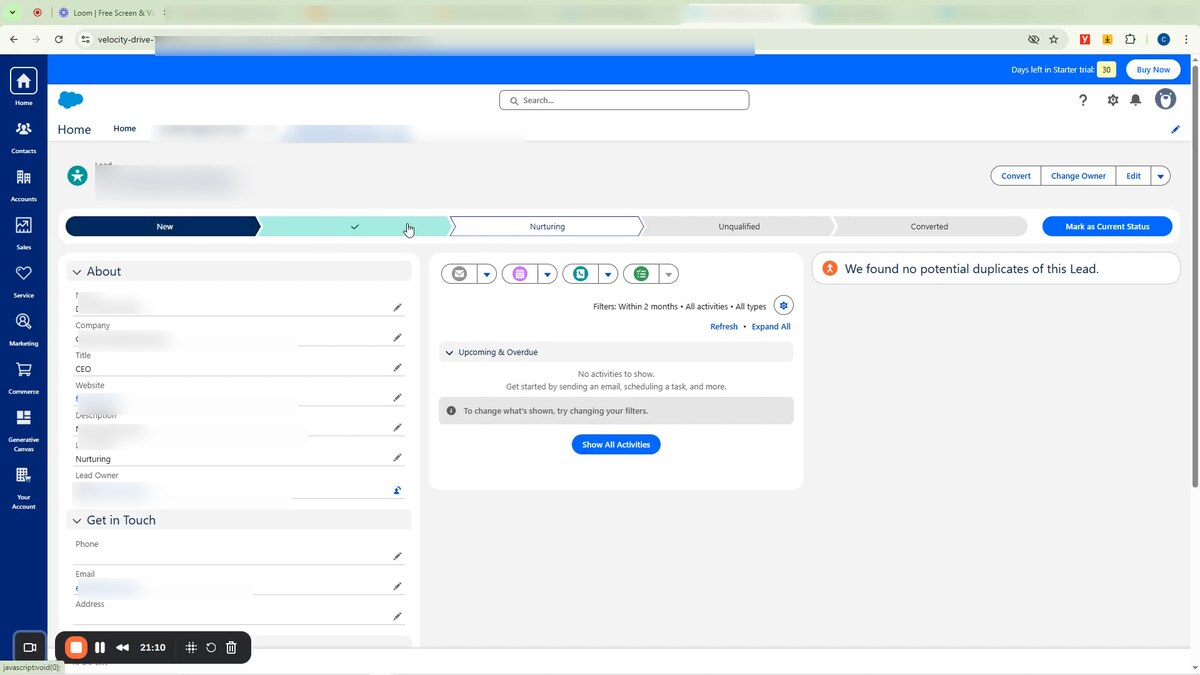
A Salesforce Lightning Lead record. The status path at the top is the surface every Sales Cloud user lives in — single-click stage progression with the rest of the page being custom fields the admin has configured. Lead name, company, email, phone, address, and Lead Owner all blurred for privacy.
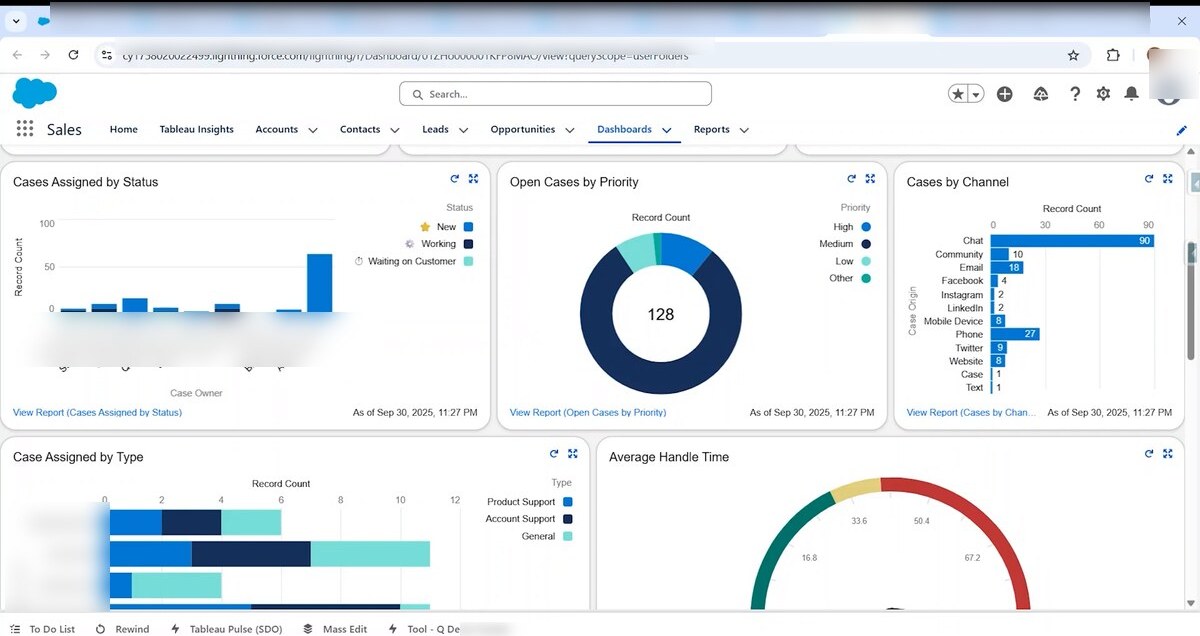
The Sales Cloud Dashboard is where Salesforce’s customisation depth becomes obvious. Every chart is a saved Report behind the scenes, each filtered and grouped per the dashboard owner. HubSpot’s equivalent dashboards exist but are intentionally simpler — Salesforce assumes a CRM admin builds each chart deliberately, HubSpot assumes the user wants an out-of-the-box answer. Owner names on the bar charts and the URL bar org subdomain blurred for privacy.
Side-by-side: time to first value
| Task | HubSpot | Salesforce |
|---|---|---|
| Initial setup + first contact imported | 2 hours | 6 hours |
| First pipeline configured | 4 hours | 12 hours |
| First automation running | 6 hours | 18 hours + admin |
| First custom report | 8 hours | 24 hours + admin |
| First marketing campaign sent | 1 day (Marketing Hub native) | 1-2 weeks (Pardot setup) |
| Team trained and using regularly | 1 week | 4-8 weeks |
This single dimension — time to first value — is what makes HubSpot the small business default. Salesforce eventually catches up and surpasses HubSpot at scale, but “eventually” is months of admin time most small businesses can’t spend.
Side-by-side: total cost of ownership at three scales
Modelling all-in cost (platform + implementation + admin) over Year 1:
| Scale | HubSpot all-in | Salesforce all-in |
|---|---|---|
| 5 users | $1,800/year (Sales Hub Starter) | $5,000/year (Starter, no admin) |
| 25 users | $32,000/year (Sales Hub Pro + Marketing Hub) | $80,000/year (Pro + 0.5 FTE admin) |
| 50 users | $90,000/year (Sales Hub Pro + Marketing Hub + Service) | $190,000/year (Pro + 1 FTE admin + implementation amortized) |
| 100 users | $200,000/year | $350,000/year |
The crossover point — where Salesforce starts being competitive on total cost — is around 75-100 users with a competent dedicated admin. Below that, HubSpot wins on TCO. Above that, Salesforce starts winning on the customization-power-per-dollar dimension.
Side-by-side: marketing automation depth
This is where HubSpot wins decisively for small business.
| Capability | HubSpot Marketing Hub | Salesforce + Pardot/MC |
|---|---|---|
| Email campaigns | Native, Mailchimp-quality builder | Pardot: workable; Marketing Cloud: enterprise overkill |
| Landing pages | Native, drag-and-drop | Pardot: yes; MC: yes (complex setup) |
| Forms | Native, embed anywhere | Pardot: yes; MC: yes |
| Marketing automation flows | Native visual builder | Pardot: yes (separate UI); MC: yes (complex) |
| ROI attribution to deals | Native (CRM + Marketing in one platform) | Manual setup + integrations |
| Bundled with CRM | Yes | Pardot is being deprecated; MC is separate billing |
| Time to first email campaign | 1-2 days | 1-2 weeks |
Salesforce is in active retreat on the marketing-automation side. Pardot is being deprecated and rebranded; Marketing Cloud was always built for enterprise complexity. For small business marketing automation, HubSpot has no real Salesforce competitor in 2026.
For the broader email-marketing decision (which platform to pair with which CRM), see our email marketing software guide.
Migration: when to switch
The natural growth path:
Spreadsheet → HubSpot Free CRM. Most small businesses start here. ~4 hours of work.
HubSpot Free → Sales Hub Starter or Pro. When you outgrow the free feature limits — typically 12-18 months in for active businesses. ~1 week of training.
HubSpot → Salesforce. When you hit the 50+ FTE / dedicated admin / complex operations threshold. Plan 2-3 months total: 1 month of Salesforce design and configuration, 4-6 weeks of parallel running, then cutover. Total cost: $100-200k typical for the migration alone.
Salesforce → HubSpot. Less common but increasingly real. Companies that initially over-invested in Salesforce — typically when a Salesforce-fluent VP joined a smaller-than-Salesforce-fits operation — sometimes pull back to HubSpot once the per-user fees and admin costs outpace the value extracted. The migration is technically simpler than the other direction (HubSpot’s import tools handle Salesforce exports cleanly), but politically harder: someone has to admit the original choice was wrong.
For the broader CRM landscape beyond just HubSpot vs Salesforce — Pipedrive, Folk, Attio, Close, Microsoft Dynamics, Zoho — see our CRM software guide, which works through the decision matrix at every team size.
Bottom line
Pick HubSpot if you’re under 50 FTE. Free CRM tier, Sales Hub Starter or Pro as you grow, all-in-one bundle that wins on time-to-value at small business scale.
Pick Salesforce if you’re 50+ FTE with a dedicated CRM admin, vertical-specific industry needs, or a Salesforce-fluent revenue team already trained on it. The depth is real; you have to do the work to extract it.
Pick neither at most early-stage companies — Pipedrive, Folk, or Attio are lighter-weight and likely sufficient for the first 50 customer relationships. Upgrade to HubSpot or Salesforce when scale forces it, not when a vendor’s marketing convinces you.
The honest takeaway: the question isn’t “which CRM is better?” — it’s “which CRM matches the operational complexity I’m running today?” Most teams over-buy, then spend the next two years fighting their tool. Right-size the CRM to where you actually are. over-bought Salesforce sometimes downgrade after realizing they don’t have the operational maturity to use it. Same migration playbook in reverse. ~1-2 months.
For the broader migration playbook, our migration tutorial framework covers many of the same principles (list cleaning, parallel running, cutover sequencing) — even though that one is email-focused, the structure transfers.
Who should pick neither
Pick Pipedrive if you’re a B2B sales team that wants pipeline-first simplicity and doesn’t need HubSpot’s marketing bundle. Cleaner UI than HubSpot for sales-only use.
Pick Folk or Attio if you’re a founder, agency, or modern SaaS team that wants a flexible relationship management tool rather than a structured pipeline CRM. We covered the alternatives in our CRM software guide.
Pick Close if you’re an outbound sales team that needs built-in calling and SMS — neither HubSpot nor Salesforce do that as natively as Close.
Pick Microsoft Dynamics 365 if you’re already deep in Microsoft 365 + Office and want CRM in the same ecosystem. Underrated alternative for Microsoft-native organizations.
Bottom line
Pick HubSpot if you’re under 50 FTE. Free CRM for the first year, Sales Hub Starter or Pro as you grow. The all-in-one bundle wins on time-to-value and total cost of ownership at small business scale.
Pick Salesforce if you have 50+ FTE on sales/CS, a dedicated CRM admin, and genuinely complex operations. Below all three of those thresholds, Salesforce is a money pit.
The wrong question is “which is the better CRM?” — they’re both excellent at the work they were built for. The right question is “do I have the operational maturity (people, time, complexity) to use Salesforce profitably?” If you can answer that honestly, the choice picks itself.
We re-test both platforms every 90 days. Last updated: April 21, 2026.
Frequently asked questions
Should a small business use HubSpot or Salesforce?
HubSpot, almost always. Until you hit 50+ FTE with a dedicated CRM admin and complex sales operations, HubSpot's all-in-one model wins on time-to-value, cost, and team adoption. Salesforce's customization power requires admin time most small businesses don't have.
What's the price difference?
At 5 users, HubSpot Free CRM is genuinely free; Salesforce Starter is $25/user/month ($125/mo total). At 25 users with full sales operations, HubSpot Sales Hub Pro is $90/user/month ($2,250/mo) vs Salesforce Professional at $80/user/month ($2,000/mo) plus typical $50-100k/year implementation cost. HubSpot's bundle is cheaper at small scale; Salesforce can be cheaper at scale if you have an admin who can use the customization power.
When does Salesforce start to make sense?
Three conditions need to be true at once: (1) 50+ FTE on the sales/CS team, (2) a dedicated CRM admin (not part-time), (3) genuinely complex sales operations that need custom field logic, multi-team workflows, or industry-specific integrations. If any one of those isn't true, HubSpot is still the better answer.
Is HubSpot Free CRM really free, or is it a freemium trap?
Genuinely free, for unlimited contacts and unlimited users. The catch is feature limits — no advanced automation, basic reporting only, limited custom properties. Most small businesses run on HubSpot Free for 12-18 months before needing to upgrade. The upgrade pricing scales aggressively, but you can stay on free indefinitely if you don't need the paid features.
Can I migrate from one to the other later?
Yes, both directions work. Both platforms support CSV import. The harder migration is the workflow rebuild — automations, custom field logic, and reporting dashboards have to be recreated manually. Plan 1-2 weeks for the migration plus 4-6 weeks of parallel running before fully cutting over. Most companies who start on HubSpot and grow to Salesforce do so successfully; reverse migrations are less common but increasingly real.
What about HubSpot's marketing features vs Salesforce + Pardot/Marketing Cloud?
HubSpot's bundled marketing (Marketing Hub) is materially better than Pardot or Salesforce Marketing Cloud for most small businesses. Pardot is being deprecated; Marketing Cloud is built for enterprise complexity. If you want marketing + sales in one platform, HubSpot wins decisively at small business scale.
The marketing tech rundown.
One short email a week. Honest takes on the tools we tested, what's worth your money, and what to skip. No fluff.
Free. Unsubscribe anytime.