comparison
HubSpot vs Pipedrive 2026: The Sticker Price Is Not the Price
HubSpot starts free. Pipedrive starts at $14. Neither of those numbers is what you'll pay. We priced both CRMs at the tier where real sales teams actually land, and the gap is bigger than any comparison table shows.
 By Manu A. · · 11 min read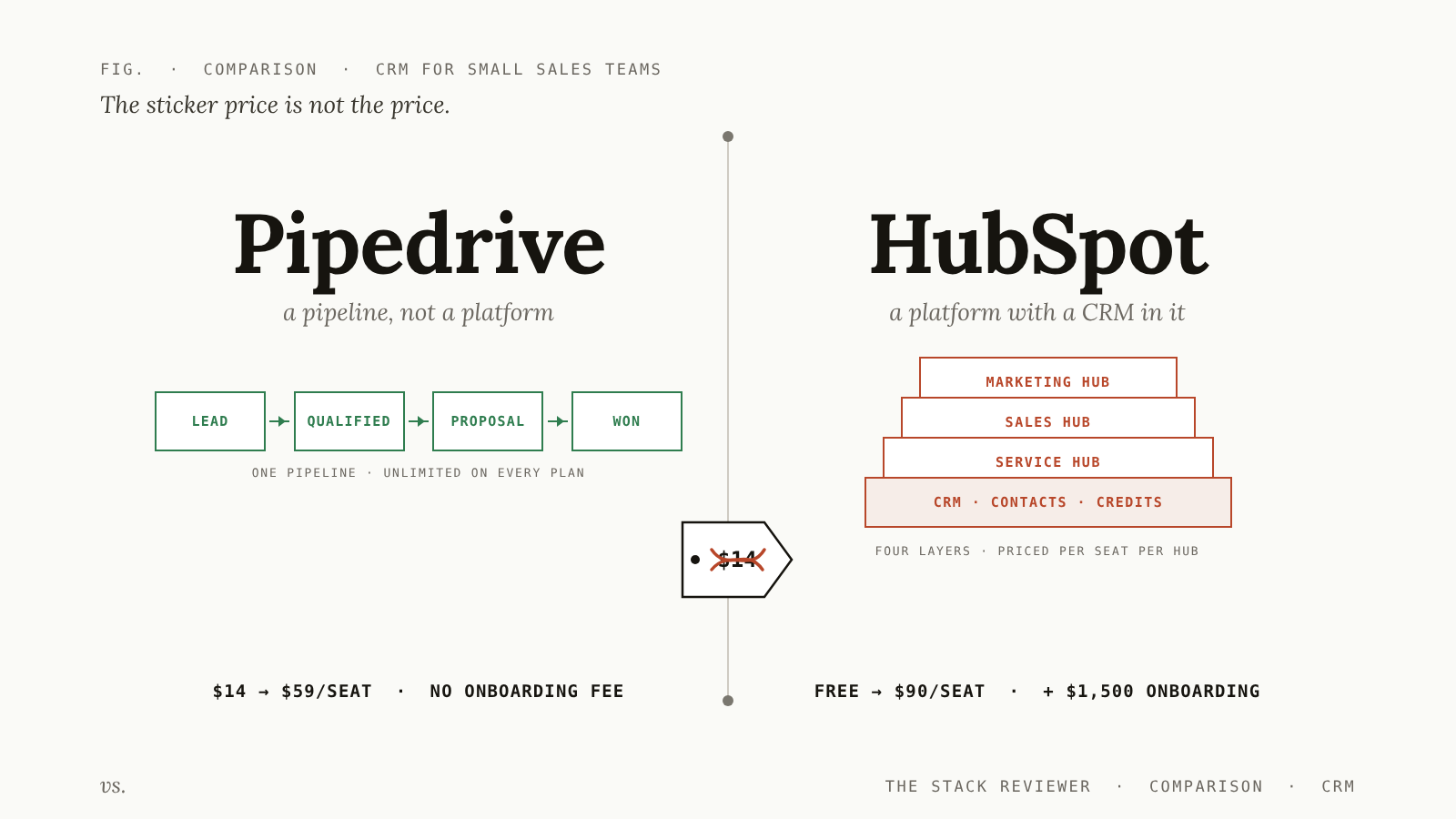
HubSpot vs Pipedrive is usually presented as a price fight that Pipedrive wins: $14 a seat against HubSpot’s sprawling platform pricing. It’s also sometimes presented as a price fight HubSpot wins, because HubSpot has a free tier and Pipedrive doesn’t.
Both framings are wrong, and they’re wrong in the same way. Nobody pays the advertised price of either CRM, because the advertised tier is not the tier your team lands on. Pipedrive’s $14 Lite plan has no email automation. HubSpot’s free plan caps at two users. The moment a sales team is real (three or more people, following up on a schedule, reporting to someone), both products move you to a tier that costs several times the headline number, and only one of them adds a mandatory four-figure fee on the way.
Quick verdict. Pipedrive for a sales team that sells, full stop: 2–20 reps, a pipeline, follow-ups, and a manager who wants a forecast. It’s faster to set up, dramatically cheaper at the tier you’ll actually use, and it doesn’t punish you for growing. HubSpot for two situations only: you’re a founder-plus-one who wants a free CRM that will never charge you until you hire, or marketing and sales genuinely share the same contact records and you’re prepared to pay platform prices for that. If you’re picking a CRM purely to run sales, HubSpot is an expensive way to do it.
Everything below is priced from the vendors’ own pricing pages, checked on 14 October 2026. We’ve flagged the one number we couldn’t verify rather than guessing at it.
At a glance
| Pipedrive | HubSpot Sales Hub | |
|---|---|---|
| Best for | Sales teams of 2–20 that want a pipeline, not a platform | Founder-plus-one on free; marketing+sales orgs on paid |
| Free tier | None (14-day trial) | Yes, up to 2 users |
| Entry paid | Lite, $14/seat/mo annual | Starter, $7/seat/mo annual ($20 monthly) |
| The tier teams land on | Growth $39 or Premium $59/seat/mo | Professional $90/seat/mo |
| Mandatory onboarding fee | None | $1,500 (Professional), $3,500 (Enterprise) |
| Deal pipelines | Unlimited on every plan | Limited by tier |
| AI usage | Included in plan | Metered: credits at $0.010, reset monthly, no rollover |
| Setup time to first real deal | Days | Weeks |
| Gets stickier over time | Mildly | Severely |
The comparison everyone makes, and why it’s useless
Search “hubspot vs pipedrive” and you’ll get roughly ten results. Nine of them are written by companies with money riding on the answer: HubSpot’s own comparison page, Pipedrive’s own comparison page, and a row of rival CRMs (monday.com, Nutshell, Insightly, EngageBay) who rank on the keyword to sell you a third thing.
That’s not a conspiracy, it’s just how this SERP is built. But it explains why every one of those pages compares the same two numbers: free and $14. Those are the numbers the vendors put on the table, and a competitor writing a comparison has no reason to dig past them.
Here’s the problem with that comparison. HubSpot’s free tier is capped at two users. Pipedrive’s $14 Lite tier has no email sync with tracking, no automations, and no nurturing sequences. All three of those start at Growth, $39. So the entry-tier comparison is between a plan that fits a two-person company and a plan that can’t send a scheduled follow-up. Neither is a CRM a sales team runs on.
The comparison that matters is at the tier where your must-have feature lives. For most teams that feature is automated follow-up plus a report the manager trusts. Price that, and the picture inverts.
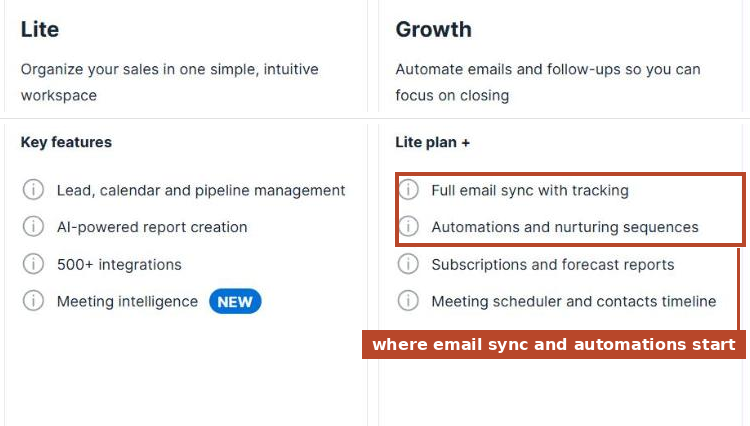 Pipedrive’s pricing page, 14 October 2026. We cropped out the price row because Pipedrive shows different prices by country; US visitors see $14 for Lite and $39 for Growth on annual billing.
How we priced this
We didn’t score features out of ten. We took three team shapes that cover most of the people asking this question, picked the cheapest plan on each product that actually does the job, and added up twelve months.
Two rules we held to:
- Year-one cost includes one-time fees. An onboarding fee you cannot decline is part of the price of the software. Leaving it out of a comparison table is how a $12,000 CRM gets presented as a $10,800 CRM.
- Annual billing on both sides. Both vendors discount it heavily and most teams take it. Pipedrive advertises savings of up to 42% for annual; HubSpot’s Starter goes from $20 monthly to $7 on an annual commitment.
Team shape 1: founder plus one
You’re two people. You need contacts, deals, and a pipeline you can see.
| Year one | |
|---|---|
| HubSpot Free | $0 |
| Pipedrive Lite (2 × $14) | $336 |
HubSpot wins outright, and it isn’t a trick. The free CRM is a real product, it doesn’t expire, and for a founder and one other person it will do the job for a long time. If this is you, stop reading and open a free HubSpot account.
Skip this if: you already know you’re hiring a third salesperson this year. The free tier’s two-user cap is hard, and the upgrade path from free is to Starter, then to Professional, which is where the cliff is. Starting on HubSpot free and growing into HubSpot Professional is the single most common way small companies end up paying $12,000 a year for a CRM they chose because it was free.
Team shape 2: three reps who follow up on a schedule
Three salespeople. You need email sync, tracked opens, and sequences so follow-ups don’t depend on someone remembering.
| Per seat/mo | Seats | Year one | |
|---|---|---|---|
| Pipedrive Growth | $39 | 3 | $1,404 |
| HubSpot Sales Hub Professional | $90 | 3 | $3,240 + $1,500 onboarding = $4,740 |
Pipedrive is 3.4× cheaper in year one and 2.3× cheaper every year after. The $1,500 is the part that never shows up in the comparison tables. It’s a required one-time fee on HubSpot’s own pricing page, not a services upsell you can wave off.
Could you run this team on HubSpot Starter at $7 a seat? Possibly, for a while. Starter is a genuinely reasonable plan. But workflow automation, forecasting and custom reporting sit at Professional, and “we’ll upgrade when we need reporting” is a sentence every sales manager says in month four.
Team shape 3: ten reps, a sales manager, real reporting
Ten seats. Lead routing, custom scoring, permissions, reports the manager builds themselves.
| Per seat/mo | Seats | Year one | |
|---|---|---|---|
| Pipedrive Premium | $59 | 10 | $7,080 |
| HubSpot Sales Hub Professional | $90 | 10 | $10,800 + $1,500 onboarding = $12,300 |
A $5,220 difference in year one, $3,720 a year after that. Over three years, choosing HubSpot here costs about $14,660 more than choosing Pipedrive, before a single add-on on either side.
That’s a salesperson’s commission. It’s worth being sure you’re buying something with it.
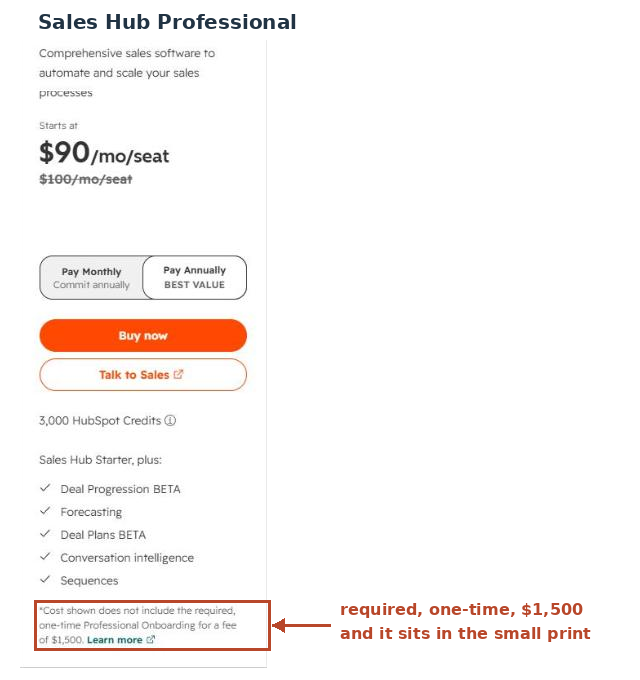 HubSpot’s Sales Hub pricing page, 14 October 2026. The fee is in the footnote, not the price.
What they don’t tell you
Three things, and each of them moves the numbers above.
1. HubSpot’s AI is metered, and the meter resets. Sales Hub subscriptions now include HubSpot Credits (500 a month on Starter, 3,000 on Professional, 5,000 on Enterprise), priced at $0.010 each. Credits reset monthly and unused credits do not roll over. Professional’s allowance works out to roughly $30 of included AI usage per seat-month pooled across the account. If AI drafting and research are part of how your reps work, that allowance is a starting balance, not a budget. Pipedrive, for now, bundles its AI into the plan price with no separate meter.
2. Pipedrive’s add-ons are where its cheapness leaks. Pipedrive lists five: LeadBooster from $32.50, Smart Docs from $32.50, Web Visitors from $41, Projects from $16, Campaigns from $13.33. Lead capture and chatbots live in LeadBooster, which Premium includes and Growth does not; e-signature lives in Smart Docs on lower tiers. A team that assumed “$39 a seat” and then bolts on LeadBooster and Campaigns is paying meaningfully more than the plan grid implies.
Here’s the honest limit: Pipedrive’s pricing page shows these as “starting from” prices without stating on the plan grid whether they bill per seat or per account. That distinction is the difference between $45/month and $450/month at ten seats, and we’re not going to guess it. Check it at checkout before you commit. It is the single biggest unknown in Pipedrive’s pricing, and every comparison article we read glossed over it, including the ones written by Pipedrive’s competitors.
3. HubSpot’s stickiness is the real switching cost, not the data. Contacts, companies and deals export cleanly from both products. Nobody gets trapped by a CSV. What traps you is everything built on the contact record: workflows, lifecycle stages, sequences, custom reports, and especially marketing automation. If your marketing team is sending campaigns out of the same HubSpot instance, the CRM is no longer a CRM you can swap. That’s not a criticism of HubSpot; it’s what an integrated platform is. It’s just worth knowing you’re buying a decision that’s expensive to reverse, at the moment you make it.
Where Pipedrive is genuinely better
Setup speed. A three-person team can import a spreadsheet, define pipeline stages, and be working real deals inside a week. There’s no onboarding fee on Pipedrive partly because there’s less to onboard.
Unlimited pipelines on every plan. Including the $14 one. HubSpot gates pipeline count by tier. If you sell two products with two different sales motions (a common shape in small B2B), this matters on day one, and on HubSpot it’s a reason to upgrade.
The interface stays out of the way. Pipedrive is a board with deals on it. Reps who resist CRMs resist it less, which is the entire ballgame: a CRM nobody updates is worse than a spreadsheet somebody does.
Price predictability. Four tiers, published, no quote required, no mandatory services attached.
Skip Pipedrive if: your sales process depends on marketing attribution, meaning knowing which campaign produced which closed deal. Pipedrive can be wired to do it with Campaigns and integrations. HubSpot does it natively because it’s the same database. If attribution reporting is a board-level metric at your company, this is the one argument that justifies HubSpot’s price.
Where HubSpot is genuinely better
The free tier. Still the best free CRM available, and we say that as people who think HubSpot’s paid pricing is aggressive. Two users, no expiry, real functionality.
One database for marketing, sales and service. When a rep opens a contact and sees every email the marketing team sent that person, every page they visited, and every support ticket they filed, that’s not a feature you can replicate with integrations. You can approximate it. It won’t feel the same.
Reporting depth at the top end. Custom objects, forecasting, cross-hub dashboards. If you have a revenue operations person whose job is building reports, they will hit Pipedrive’s ceiling and they won’t hit HubSpot’s.
Integration breadth. More native integrations, and fewer of them routed through Zapier. Pipedrive’s 500+ integrations are real, but the long tail leans harder on middleware, which is its own line item.
Skip HubSpot if: you’re buying it to run a sales team and nothing else. You’ll pay platform prices for a CRM and use maybe a third of what you’re paying for. The most expensive CRM mistake we see small companies make isn’t picking the wrong tool. It’s picking a platform when they needed a pipeline.
The decision, in one pass
Answer these in order and stop at the first yes.
- Are you two people or fewer, and staying that way this year? → HubSpot Free. $0 beats everything.
- Does marketing report on which campaign produced which closed deal, and does leadership look at that number? → HubSpot Professional. Budget $12,300 in year one at ten seats and mean it.
- Is your sales process “call people, follow up, close, report to the manager”? → Pipedrive. Growth at three seats, Premium once you need lead routing and custom scoring.
- Still unsure? → Pipedrive, on the 14-day trial. It is far easier to outgrow Pipedrive and move to HubSpot later than to discover in month eight that you’re paying $12,300 for a pipeline. The switching cost runs in one direction, and you should spend the cheap year first.
Bottom line
Pipedrive is the better CRM for selling. HubSpot is the better platform for a company where selling is one of several things happening to the same contact record. Those are different purchases and they cost very different amounts of money.
If you take one number away from this piece, make it this one: at ten seats, over three years, the choice is worth about $14,660. That gap doesn’t come from features. It comes from the fact that the plans both companies advertise are not the plans sales teams end up on, and only one of the two attaches a required $1,500 fee to the plan you’ll land on.
Start on HubSpot free if you’re tiny. Start on Pipedrive if you’re a sales team. Move to HubSpot when marketing attribution becomes a number someone gets asked about in a board meeting, and not one quarter before.
Pricing for both products was read directly from Pipedrive’s pricing page and HubSpot’s Sales Software pricing page on 14 October 2026. Vendors change prices without notice; if you’re reading this months later, check both before you budget. We flag the date on every pricing claim for exactly this reason.
Read next: our comparison methodology applied to SEO tools uses the same year-one-cost framing, Customer.io vs Klaviyo covers the adjacent decision for B2B SaaS marketing automation, and the email marketing software guide explains why your CRM should not also be your email platform. If you’re picking your whole first stack, start with SEO tools for small business.
Frequently asked questions
Is Pipedrive cheaper than HubSpot?
At the entry tier, no. HubSpot has a free plan for up to 2 users and Pipedrive has none. At the tier where most growing sales teams land, yes, and by a lot. A 10-seat team on Pipedrive Premium pays $7,080 a year. The same team on HubSpot Sales Hub Professional pays $10,800 a year plus a required one-time $1,500 onboarding fee, so $12,300 in year one. Prices verified on both vendors' US pricing pages on 14 October 2026.
Does HubSpot really charge a mandatory onboarding fee?
Yes. HubSpot's own pricing page lists a required one-time onboarding fee of $1,500 for Sales Hub Professional and $3,500 for Enterprise. It is not optional and it is not included in the advertised per-seat price. Starter and Free have no onboarding fee.
What is HubSpot's free CRM actually limited to?
Two users. That is the hard limit that matters. The free tier is genuinely useful for a founder and one other person tracking deals, and it is the single best reason to start on HubSpot. It stops being a plan the moment you hire a third salesperson.
Which CRM is easier to set up?
Pipedrive, and it isn't close. Pipedrive is a pipeline with fields attached, so a small team can be running real deals the same week. HubSpot is a platform with a CRM in it. The flip side of the onboarding fee is that HubSpot charges for onboarding because most teams need it.
Can I switch from HubSpot to Pipedrive later?
Contacts, companies and deals export cleanly from both. What doesn't move is everything built on top: workflows, sequences, custom reports, lifecycle stages and any marketing automation tied to the same contact records. Assume a week of rebuild per year of accumulated setup, and note that HubSpot gets stickier the more of your marketing lives in it.
What do HubSpot Credits cost and do they roll over?
HubSpot's AI features are metered in credits at $0.010 per credit. Sales Hub Starter includes 500 per month, Professional 3,000, Enterprise 5,000. Credits reset monthly and unused credits do not roll over. Professional's 3,000 credits work out to about $30 of included AI usage a month, so plan for overage if AI writing or research is part of your rep workflow.
The marketing tech rundown.
One short email a week. Honest takes on the tools we tested, what's worth your money, and what to skip. No fluff.
Free. Unsubscribe anytime.