opinion
Email Deliverability in 2026: What Most Marketers Get Wrong
Inbox placement is rarely a platform problem. It's list hygiene and warm-up. We audited fifty-plus stores and the same six mistakes show up every time.
 By Manu A. · · 9 min read ·
Updated
By Manu A. · · 9 min read ·
Updated 
There’s a moment every email marketer hits, usually 12-18 months into a list’s life: the open rates start sliding. Campaigns that used to get 30% opens are now getting 18%. Click-through rates dropped. Reply rates evaporated. The first instinct is panic. The second is to blame the platform. The third — usually after a month of unsuccessful platform shopping — is to actually understand what happened.
We’ve audited deliverability for fifty-plus brands across DTC, SaaS, B2B, and creator categories. The same six mistakes show up every time. None of them are platform-specific. All of them are preventable.
This is the opinion piece our deliverability audits keep producing. If you’re seeing inbox placement slide, read this before you switch platforms.
What deliverability actually is
Deliverability is the rate at which emails you send land in the inbox (vs spam folder, vs not delivered at all). Industry baseline: 94-97% inbox placement is healthy. Below 90% is failing. Below 85% is broken.
The thing most people miss: deliverability is a function of trust signals to receiving servers (Gmail, Outlook, Yahoo, Apple, etc.), not a feature of your sending platform. Receiving servers look at:
- Domain reputation (built up over time as your sending domain consistently sends mail people open and click)
- Authentication records (SPF, DKIM, DMARC — proving the email is actually from your domain)
- Engagement signals (open rate, click rate, reply rate, complaint rate, “this is not spam” votes)
- Sending pattern (consistent volume vs sudden spikes; consistent recipient set vs new lists)
Your platform’s job is to provide solid infrastructure around all four. The choice of platform matters less than what you do with it.
Mistake 1: Sending to subscribers who aren’t reading
The single biggest cause. If 30% of your list hasn’t opened anything in 90 days, sending to that 30% actively damages your domain reputation. Receiving servers notice that you keep sending to people who never engage and start filtering accordingly.
The instinct most marketers have — keep sending to non-openers because “maybe they’ll open eventually” — is exactly wrong. Email platforms charge by subscriber count, but you should think of subscriber count as cost and engaged subscriber count as asset.
The fix: Run a sunset policy. Define an inactivity threshold (90 days no opens is standard). Send a re-engagement campaign once: “Are you still reading? Click below to keep getting these.” Anyone who doesn’t engage in the next 14 days, suppress (don’t delete — suppress, so they can resubscribe if they want).
We’ve seen domain reputation recover from “near-blocked” to “preferred sender” within 30 days of running this single hygiene step on stores that had been bleeding deliverability for months.
Mistake 2: Authentication records you set up once and never check
SPF, DKIM, and DMARC are the three records that prove the email you send is actually from your domain. Setting them up wrong — or setting them up correctly and then changing platforms without updating them — is the second most common cause of deliverability failure.
The most common variants we see:
- SPF record exists but doesn’t include the new sending platform after a migration
- DKIM signing exists but uses the old platform’s selector
- DMARC policy is set to
p=none(monitoring only) and was never tightened top=quarantineorp=reject - Multiple SPF records in DNS (you can only have one)
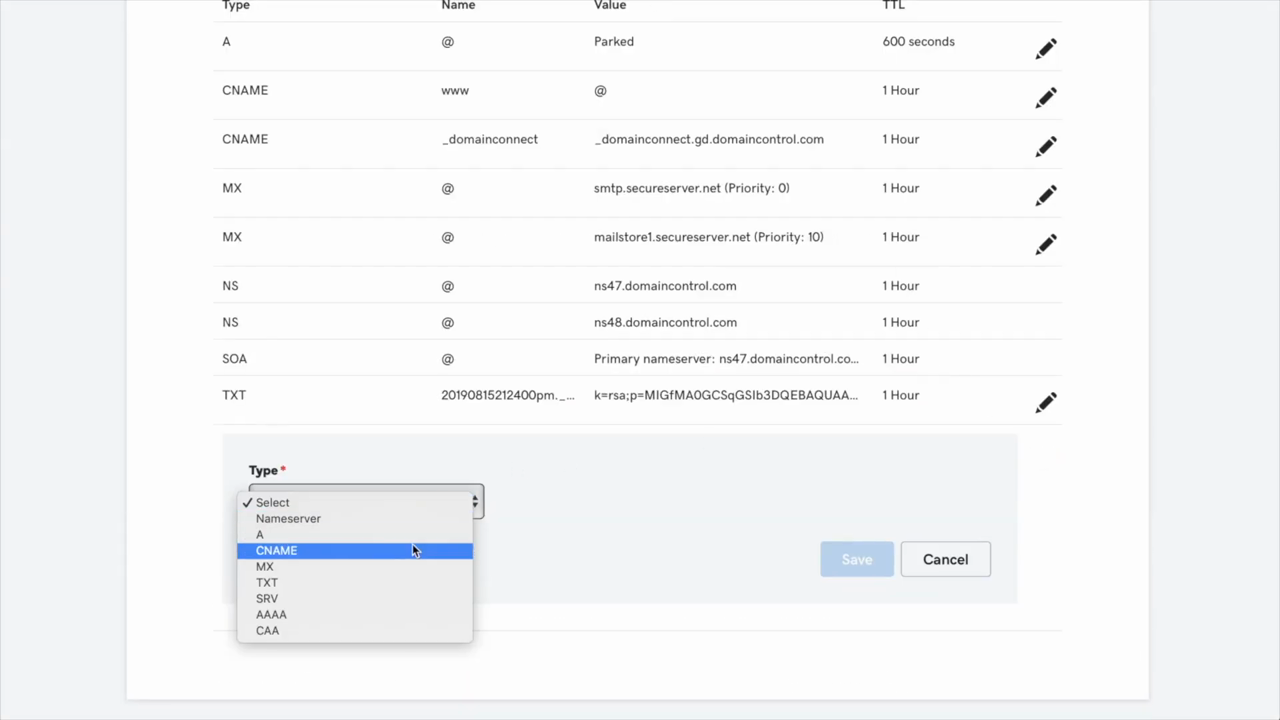
Frame from “Getting Started With Postmark in 5 Steps.” What the records look like at a registrar’s DNS panel: a row per record, with Type / Name / Value / TTL columns. The exact values come from your sending platform — but the panel itself is the same regardless of registrar.
The fix: Two free tools. (1) MXToolbox for a quick SPF/DKIM/DMARC lookup on your domain. (2) Google Postmaster Tools — verify your domain and watch the authentication panel. If anything in either tool shows red, fix it before sending another campaign.
After every platform migration, run both checks within the first hour. Fix what’s broken. We covered the full migration playbook in our Mailchimp migration tutorial — domain authentication is step 0.3, before list import.
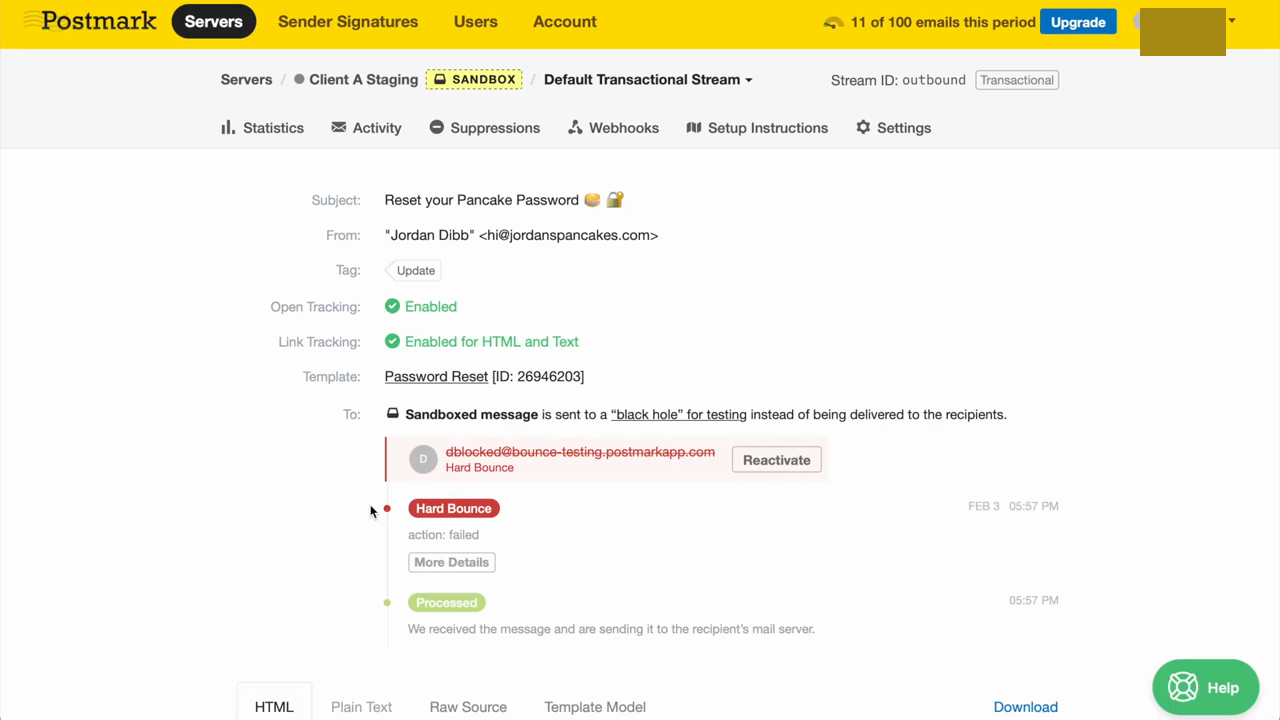
Source: Postmark tutorial. What good deliverability monitoring looks like: every event (Processed, Hard Bounce, Delivered, Opened, Spam Complaint) attached to the individual message, with the bounce reason exposed. Most marketing platforms aggregate this; transactional providers like Postmark surface it per-message because the engineer reading the dashboard needs to act on a specific failure.
Mistake 3: Skipping warm-up after migration or pause
Every email platform routes your sends through a shared IP pool (or your dedicated IP, if you’re at that scale). Receiving servers maintain reputation scores per IP. When you switch platforms, you start sending from a new IP pool with no history of your domain sending consistently.
If you immediately blast your full list from the new platform, the new IP pool sees an unusual volume spike from your domain and treats subsequent sends with suspicion. Even if you reach inbox initially, your reputation degrades over 7-14 days of high-volume sending without engagement signal building.
The fix: Warm up gradually. Days 1-3: send to your most engaged 10-20% of subscribers (last-30-days openers). Days 4-7: expand to last-60-days. Days 8-14: expand to last-90-days. Day 15+: full list, normal cadence.
This rule applies any time you:
- Switch platforms
- Change sending domain
- Pause sending for 30+ days and return
- Add a meaningful new sender (e.g., new department, new sub-brand on a different subdomain)
Mistake 4: Buying or scraping email lists
We shouldn’t have to write this in 2026, and yet. Bought lists, scraped LinkedIn lists, “free 50,000 emails” Black Friday deals — all of these poison your domain reputation faster than any other single mistake.
The mechanics: bought lists contain a high percentage of spam traps (email addresses created specifically to catch buyers of stolen lists), unengaged subscribers, and people who never opted in to your business. Sending to them generates spam complaints, low engagement, and immediate domain reputation damage. Once your domain is on shared blocklists from a single bad sending session, recovery takes weeks of careful sending.
The fix: Don’t. Build the list organically through opt-in forms, lead magnets, paid acquisition with explicit consent, and customer signups. The slower-grown list is worth ~10× more in revenue per subscriber than a bought list, and it doesn’t poison your reputation.
If you’ve already done this and your reputation is damaged: stop sending to the bought subscribers immediately, run a sunset campaign for everyone else, and warm up from your most-engaged base for the next 30 days.
Mistake 5: Not segmenting send volume by engagement
Related to mistake 1 but more specific. Even if you’re not blasting unengaged subscribers, sending the same volume to engaged and unengaged subscribers conflates them in receiving server reputation models.
The fix: Three-tier engagement segmentation:
- Tier 1 — Active (last 30 days): Send everything. Campaigns, automations, broadcasts.
- Tier 2 — Recent (31-90 days): Send most things, but skip the lowest-priority broadcasts.
- Tier 3 — Lapsed (91-180 days): Send only re-engagement campaigns, not promotional broadcasts.
- Tier 4 — Inactive (180+ days): Suppress.
This single segmentation pattern, applied for 30 days, typically recovers 1-2 percentage points of inbox placement on stores that had been running into spam folders.
Mistake 6: Spam-trigger words (mostly a 2010 problem now)
The most over-cited deliverability advice. Yes, “FREE FREE FREE” in a subject line is bad — but mostly because it makes you look like a 2010 spammer, not because of literal word filters.
Modern filters are engagement-based, not keyword-based. “Free” in a subject line from a sender with strong domain reputation lands in inboxes consistently. The same word from a low-reputation sender goes to spam. The word isn’t the problem; the sender is.
The actual subject-line advice in 2026: Write the subject line a real person would write to a real friend. Avoid screaming caps and excessive emoji. Don’t start with “Re:” or “Fwd:” if it’s not a reply. Don’t use deceptive open-rate hacks (“Your account…” when it’s a marketing email). Beyond that, write what you’d write.
What to actually do, in order
If you’re trying to improve deliverability today:
- Install Google Postmaster Tools. Verify your domain. Wait 7 days for data. Look at “Domain reputation” panel. If it’s High or Medium, you’re fine on Gmail. If Low or Bad, you have work to do.
- Check authentication. SPF + DKIM + DMARC all need to be set up correctly. Use MXToolbox.
- Run a sunset campaign. Define inactive (90+ days no engagement). Send one re-engagement email. Suppress non-engagers after 14 days.
- Segment by engagement tier. Three tiers as above. Adjust send volume by tier.
- Run a Mail-Tester check. Free tool: send a test email, get a score against spam filters. Score < 9/10 means you have specific things to fix; the tool will tell you which.
- Wait 30 days and re-check Google Postmaster. Reputation should improve. If it doesn’t, you have a deeper issue (often: still sending to too many disengaged subscribers; check your segmentation more carefully).
This is roughly the same playbook we run in paid audits. It’s free, it works, and it’s almost always what’s actually broken — not the platform.
When platform choice does matter
For completeness: there are a few cases where platform choice meaningfully affects deliverability.
Brand-new senders with no domain reputation. Some platforms have stronger shared IP pools than others — new senders inherit IP pool reputation until they build domain reputation of their own. Klaviyo, MailerLite, and ConvertKit (Kit) tend to have stronger pools than the cheapest budget tools.
High-volume senders (>500k sends/month). At this scale, dedicated IP and sender services from premium providers (Postmark, SendGrid Pro, Klaviyo Pro) start mattering. Most stores never reach this scale.
Compliance-heavy industries. Some platforms enforce stricter content policies (no CBD content, restricted finance content, etc.). If you’re in a flagged industry, picking a platform that explicitly serves your category (e.g., MailerLite’s tolerance vs Mailchimp’s stricter policies) can affect deliverability even with good practices.
Outside those three cases, switching platforms to fix deliverability is the most expensive way to not fix it. The list, the authentication records and the send pattern move with you, and so does the problem. Run the six steps above first. If Google Postmaster still shows a Low reputation after 30 days of clean sending, then look at the platform; before that, the platform is an alibi.
If you are in the middle of a move anyway, our Mailchimp migration tutorial has the warm-up schedule in full, and the best transactional email services review covers the dedicated-IP tier for high-volume senders.
We re-test the tooling in this piece every 90 days. Last updated: October 14, 2026.
Frequently asked questions
Why are my emails going to spam?
Six causes account for most cases, in order: (1) sending to disengaged or unverified subscribers; (2) a mismatch between your sending domain and authentication records (SPF, DKIM, DMARC); (3) sudden volume increases without warm-up; (4) spam-trigger language in subject lines or bodies; (5) sending from a shared IP pool with poor reputation; (6) sending to too many people who never opened your emails. Platform choice rarely tops this list.
Does the email marketing platform I use affect deliverability?
Less than people think. Modern platforms (MailerLite, Klaviyo, Beehiiv, Customer.io, etc.) all hit 94-96% inbox placement with default settings if your list and sending behavior are clean. Switching platforms to fix deliverability rarely works — you usually move the same list and same problems to a new IP pool that takes 30 days to recover.
How do I check my actual deliverability rate?
Three free tools: (1) Mail-Tester — sends a test email, gets a score against spam filters. (2) Google Postmaster Tools — shows your sender reputation as Gmail sees it for your domain. (3) GlockApps free version — multi-inbox seed test. Don't trust your platform's 'open rate' as a deliverability proxy — Apple Mail Privacy Protection inflates open rates 3-4×.
What is email warm-up and do I need it?
Warm-up is the practice of gradually increasing send volume from a new domain or IP over 14-30 days, so receiving servers see consistent low-volume engagement before high-volume sends. Yes, you need it: any time you switch platforms, change sending domains, or after a long pause. Skipping warm-up is the most common preventable cause of deliverability collapse.
Should I use a dedicated IP for email sending?
Probably not. Dedicated IPs require ~50,000+ sends per month to maintain reputation. Below that volume, you're better on a shared IP pool managed by your platform. Most stores under $100k/mo in revenue should stay on shared IPs. Dedicated IP is an optimization for scale, not a deliverability fix.
Are spam-trigger words still a thing in 2026?
Yes but less than you'd think. Modern filters look at engagement and sender reputation more than word lists. 'Free' in a subject line from a sender with strong domain reputation gets through fine. The same word from a low-reputation sender goes to spam. Don't engineer subject lines around old word-lists; engineer them around real engagement.
The marketing tech rundown.
One short email a week. Honest takes on the tools we tested, what's worth your money, and what to skip. No fluff.
Free. Unsubscribe anytime.