listicle
Best Keyword Research Tools for Bloggers 2026 (3 Are Free)
Eight keyword research tools tested on the same blog niche, three of them free forever. The honest verdict on what to pay for and what not to.
 By Manu A. · · 17 min read ·
Updated
By Manu A. · · 17 min read ·
Updated 
There’s a popular Twitter take that “you don’t need keyword research tools, just write what you’d want to read.” The take is wrong, though parts of the surrounding SEO content advice circulating in 2026 — keyword density targets, “write 2,000+ word articles,” publishing-frequency superstition — really are outdated. Some keyword research is the difference between writing into a void and writing for searchers who exist. Doing it well takes a tool — but not necessarily an expensive one. Keyword research for blogs sits in its own category from agency or ecommerce keyword research: the right targets are lower-volume long-tail queries, low-difficulty topics where a blogger can actually rank, and tools without feature bloat. Most of what Ahrefs and SEMrush sell is overkill for that job — if your reason for being here is “I want sites like Ahrefs but cheaper,” that’s the better article to start with.
We ran eight keyword research tools through the same workflow on the same niche for two months. Same target topics. Same questions. Same expected output (a list of 30 keywords sorted by difficulty and volume). The honest answer is that most bloggers are paying for capabilities they won’t use — and that the right tool for a blogger looks very different from the right tool for an agency.
Quick verdict. For most bloggers: Mangools KWFinder at $18.85/mo billed annually (about $31 monthly) is the right answer. Fast, accurate enough, easy to read. Keysearch at $17/mo is the rock-bottom paid option that still works. Google Search Console is the most underrated free tool and should be in every blogger’s stack regardless of what else you pay for. And if your budget is zero: three of the eight tools here cost nothing at all, forever. Google Search Console, Google Trends, and Ahrefs Webmaster Tools together cover most of what a new blog actually needs, which is why we rank them alongside the paid options instead of in a footnote. The rest are either too expensive (Ahrefs full plan), too unreliable (Ubersuggest), or too narrow (AnswerThePublic).
This piece walks through what each tool actually does well, what their marketing pages oversell, and which combinations we’d actually run.
At a glance: how the eight compare
| Tool | Best for | Monthly cost | Standout strength |
|---|---|---|---|
| Mangools KWFinder | Most bloggers | $18.85/mo annual | Fastest readable interface in the category |
| Keysearch | Tightest budgets | $17/mo | Cheapest paid tool that’s actually usable |
| Ubersuggest | Lifetime-deal hunters | $29/mo or $290 once | Lifetime payment option exists |
| AnswerThePublic | Question-driven content | $5/day or $99/mo | Best at surfacing question-format keywords |
| Ahrefs Free (Webmaster Tools) | Site owners with verified domains | Free | Real Ahrefs data, just constrained |
| Google Search Console | Every blogger | Free | Real click + impression data for keywords you rank for |
| Google Trends | Topical timing | Free | Best at telling you if a topic is rising or falling |
| KeywordTool.io | YouTube + Bing + Amazon | $89/mo | The only viable tool for non-Google keyword research |
How we tested
Each tool ran for at least 30 days against the same workflow.
Topic seeds. We started with 10 seed topics drawn from a real niche blog (food + lifestyle). Each tool was asked to expand each seed into 30 keyword candidates, sorted by difficulty.
Time to result. Stopwatch on. How long to get from “blank canvas” to “30 keyword shortlist with volume + difficulty”? Mangools and Keysearch finished in under 2 minutes; Ubersuggest took 3-4 minutes; AnswerThePublic and KeywordTool.io took 5+ minutes for similar output.
Volume agreement. We cross-checked volumes across tools. Where the major tools disagreed by more than 30%, we noted which tool to trust based on Google Search Console actuals (where data existed).
Difficulty accuracy. We picked 20 mid-difficulty keywords and tracked which tools’ difficulty scores correlated with actual ranking effort. Mangools and Ahrefs were closest to reality; Ubersuggest was meaningfully off.
Real billing math. We modelled cost across solo blogger (1 site), small blogger network (3 sites), and small agency (10 sites).
We re-test every 90 days. Last updated noted at the bottom.
What good keyword research for blogs actually looks like
Before the tools themselves, the underlying job is worth getting right. Keyword research for blogs is a narrower discipline than the agency-flavoured “find every keyword in your industry and rank for it” workflow that the big-five tools (Ahrefs, SEMrush, Moz, Sistrix, Conductor) optimise for. Three differences shape which tool you actually need.
Difficulty over volume. A blogger without a serious backlink portfolio cannot outrank Wirecutter and HubSpot for “best CRM software” — the keyword has 6,000/mo volume and a difficulty score north of 60. The keyword they can rank for is “best CRM software for [specific niche] under $50/mo” — 80/mo volume, difficulty 18. The tool needs to make those low-difficulty long-tails findable. Mangools, Keysearch, and Ahrefs Webmaster Tools all do this well; Ubersuggest’s difficulty score is unreliable enough to push you toward the wrong fights.
Long-tail discovery, not seed-keyword expansion. Agencies start from one head term and expand outward. Bloggers start from a topic intuition and need to find the specific question phrasing their audience uses — “how to set up a Shopify store on a budget” rather than “Shopify”. AnswerThePublic and Google Search Console autocomplete suggestions are uniquely good at this. Most paid tools generate seed-keyword lists faster than they generate long-tail variation.
Intent that maps to blog monetisation. Bloggers earn from informational and commercial-investigation queries (display ads, affiliate clicks, email signups). They do not earn from transactional queries the way ecommerce stores do. A keyword tool optimised for “buyer intent” filters away the queries blogs actually need. Mangools’ SERP overview, GSC’s actual click data, and Google Trends’ rising-topic feed are all better-suited to the job than SEMrush’s commercial-keyword filters.
If you’re choosing a tool, the question isn’t “which has the most data” — it’s “which surfaces the queries a blogger can win.” That’s the lens for the eight reviews below.
1. Mangools KWFinder — the default for most bloggers
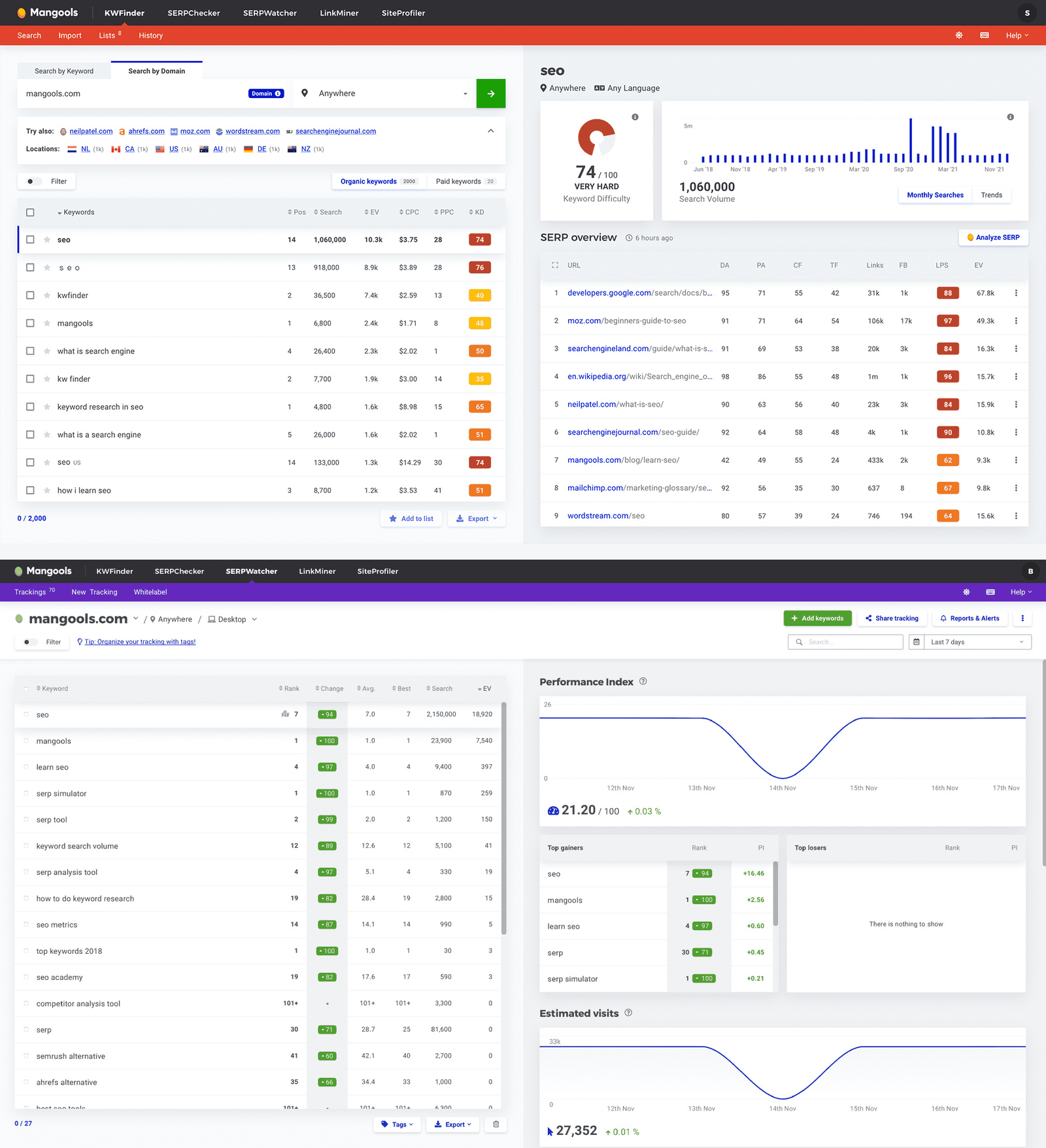
Source: Mangools / KWFinder. The “type-to-insight” workflow that makes KWFinder the fastest readable keyword tool in the category — KD score, volume, and SERP analysis on the same screen.
Mangools KWFinder is what we recommend by default. It’s not the deepest tool, but it’s the most legible. Type a seed keyword and the screen shows you, all at once: keyword variations sorted by difficulty, volume trend over 12 months, the SERP for the seed term with each ranking page’s authority score. No clicks needed.
Best for. Solo bloggers, content marketers, small SaaS marketing teams. Anyone publishing 2-10 articles per month.
Skip KWFinder if. You’re managing 5+ client sites — the plan limits will hurt. You’re a serious link-builder — the bundled LinkMiner backlink tool is shallow vs Ahrefs.
Pricing reality. Basic: $29/mo (100 keyword lookups/24h, 25 SERP lookups/24h). Premium: $44/mo (500 lookups, more limits). Agency: $89/mo (multi-user, much higher limits). Annual billing knocks 35% off — bringing Basic to ~$19/mo effective.
Where KWFinder wins.
- Fastest “type-to-insight” workflow in the category
- Difficulty scoring is calibrated well for blogger-grade keywords
- SERP analysis on the same screen as keyword expansion saves clicks
- Bundled with four other tools (SERPChecker, SERPWatcher, LinkMiner, SiteProfiler) at the same price
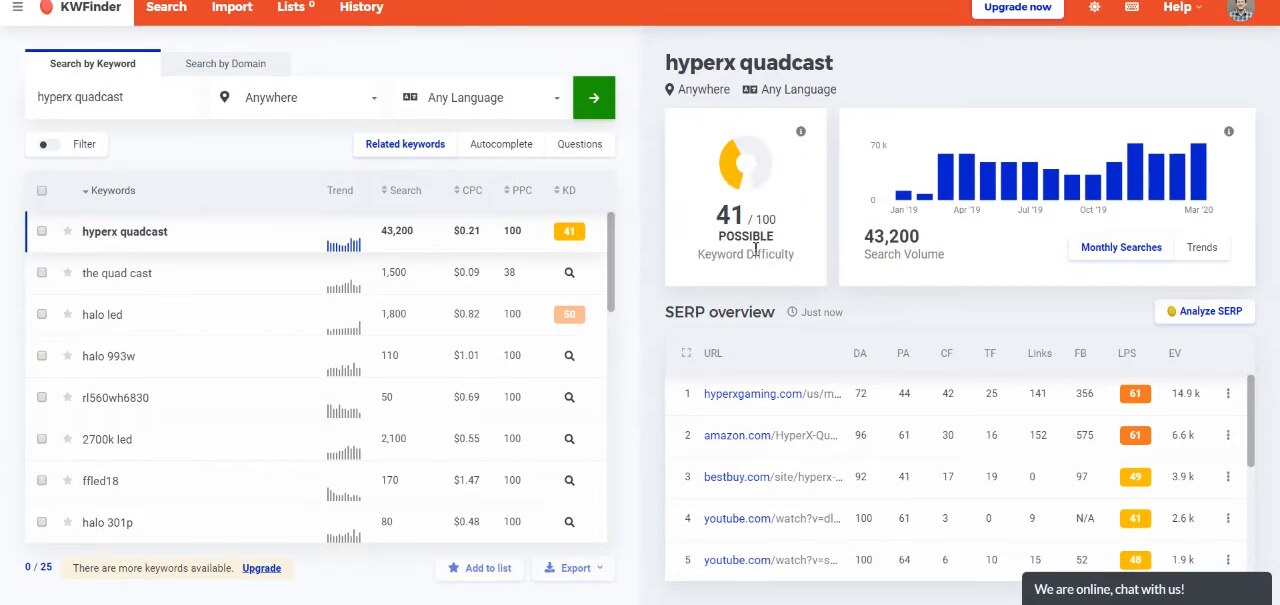
The KWFinder results view in one screen. Type a seed term, get the keyword expansion table, KD donut, volume trend, and SERP overview side by side. This is the “type-to-insight” workflow that makes KWFinder the fastest readable tool in the category for blogger-grade research.
The KD score is calibrated for bloggers. KWFinder’s 0-100 difficulty score is the working surface most bloggers use to decide what to write. Below 30 is easy enough to rank with light effort. 30-60 is the realistic blogger sweet spot. Above 60 means you’re competing with Wirecutter and HubSpot, which is a losing game without a serious backlink portfolio. Two examples:
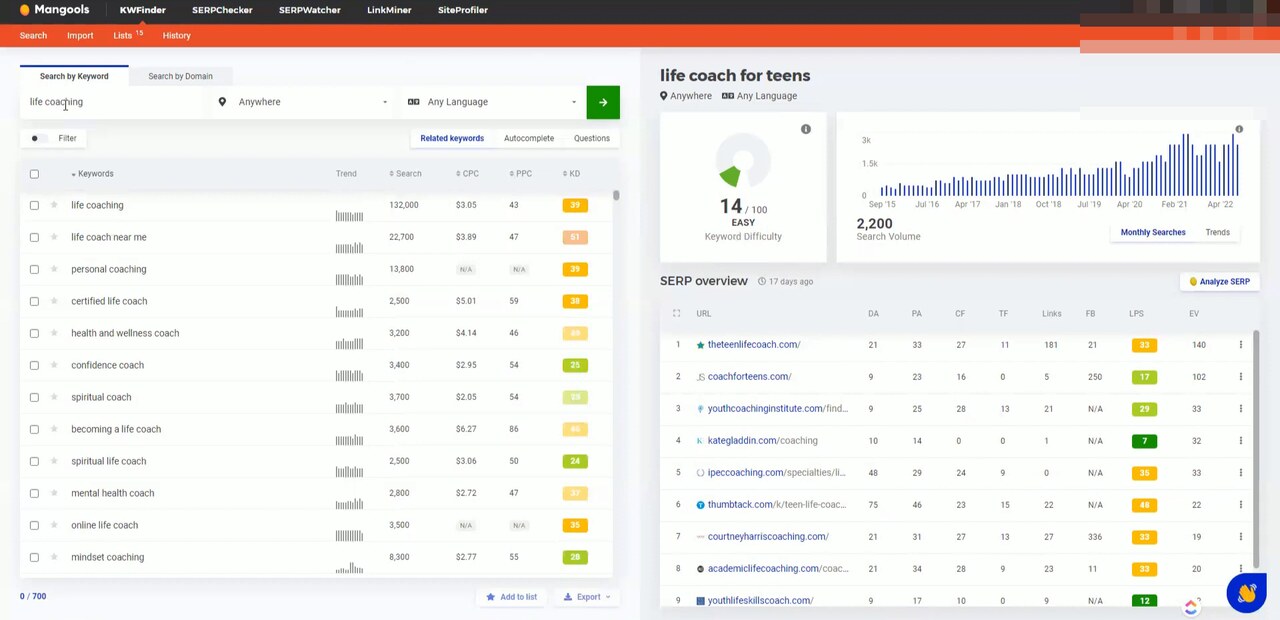
An easy target: life coach for teens, KD 14, 2,200 monthly searches. Green donut, low-DA competitors in the SERP. This is the kind of long-tail every blogger should be filtering toward.
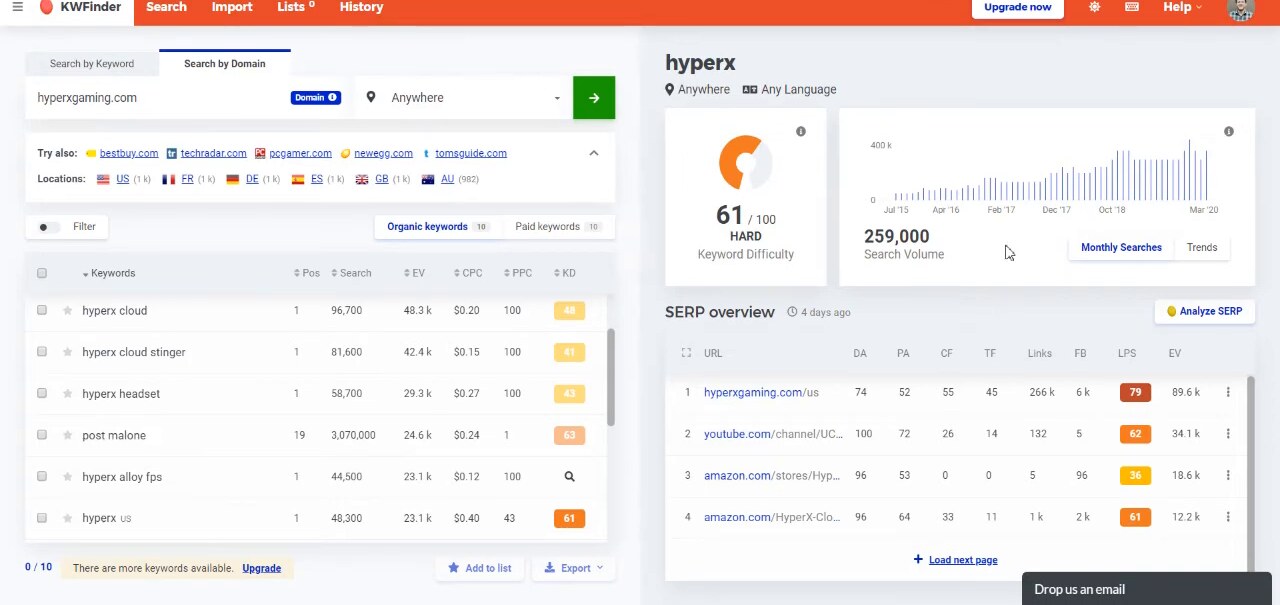
A hard target: hyperx, KD 61, 259,000 monthly searches. Red donut, brand-owned domain at the top of the SERP, Amazon and Best Buy locking down the next slots. The volume is real but a blogger cannot rank here. Pass.
Where it loses.
- Backlink data is shallow vs Ahrefs/SEMrush
- Plan limits restrict heavy research days (you’ll hit them by lunch on a research-heavy day)
- Less coverage of non-English markets
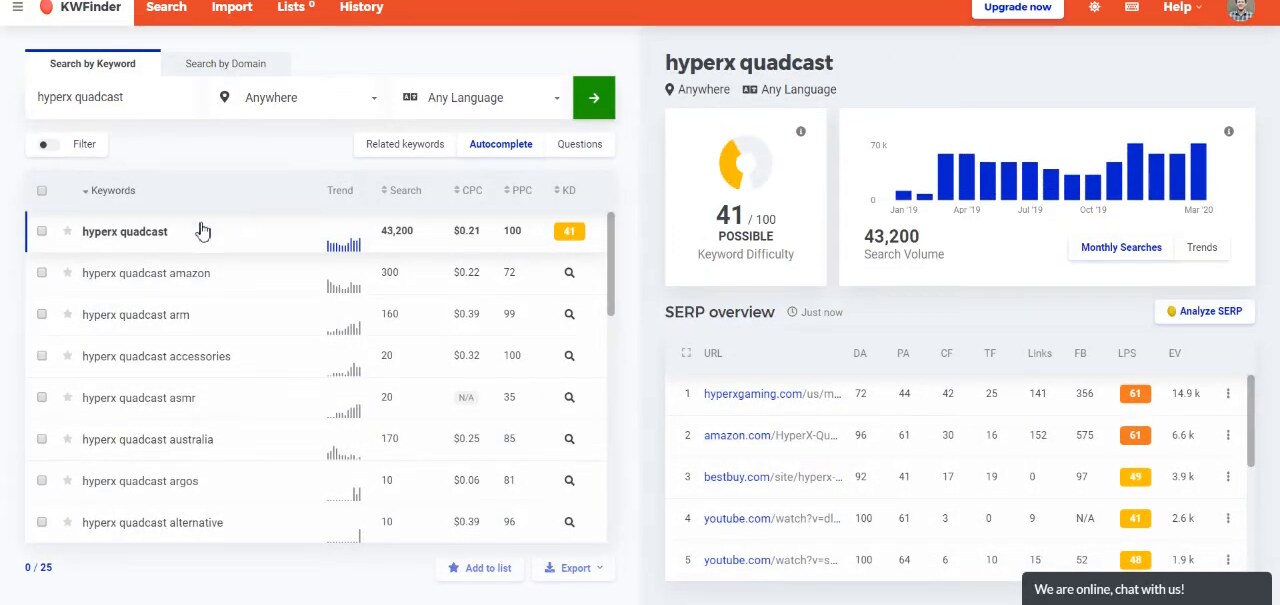
The Autocomplete tab pulls Google’s actual autocomplete suggestions for a seed and surfaces them with full metrics. This is where blogger-grade long-tails come from. amazon, accessories, alternative, australia, argos suffix variants are the kinds of low-difficulty topics worth filtering for.
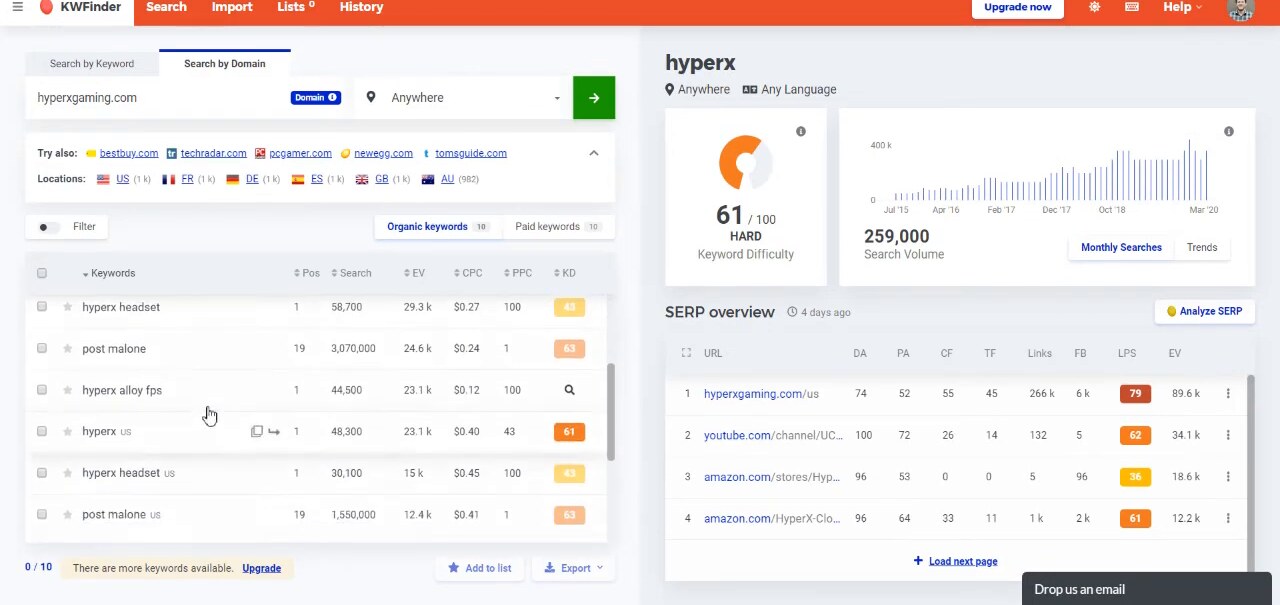
Search by Domain reverses the workflow. Plug in a competitor URL, see every keyword they rank for with KD and volume attached. This is where bloggers find the keyword gaps a niche site is leaving on the table.
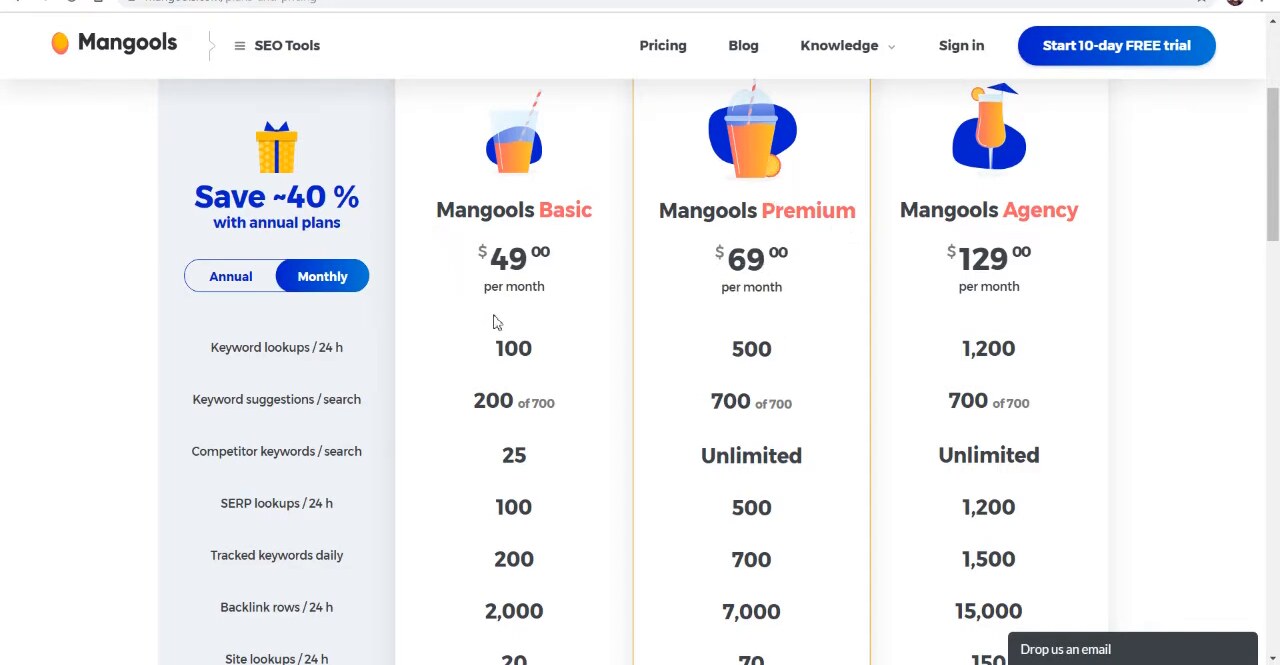
Mangools published-pricing tiers as of 2026. The monthly numbers shown ($49 / $69 / $129, since replaced: as of July 2026 Basic is $18.85/mo billed annually, about $31 monthly) are list prices; annual billing pulls Basic to ~$29/mo, Premium to ~$44/mo, and Agency to ~$89/mo. The 24h lookup limits matter more than the price for working bloggers, which is why Basic at 100 lookups/day is enough for most non-agency workflows.
2. Keysearch — the rock-bottom blogger pick
Keysearch is the cheapest tool in this list that still works. It does keyword research, rank tracking, and basic backlink analysis for $17/month. It’s not as polished as Mangools, but it’s not crippled either — and at the price, the gap doesn’t matter for most bloggers.
Best for. New bloggers. Niche site builders. Anyone whose monthly tool budget is under $25.
Skip Keysearch if. You’re scaling past 3-4 sites. The interface gets clunky at scale. You need a polished UI to onboard a teammate.
Pricing reality. Starter: $17/mo (200 daily searches, 80 keywords tracked). Pro: $34/mo (500 searches, 200 keywords). Annual knocks 20% off.
Where Keysearch wins.
- Cheapest tool worth using
- Includes a YouTube SEO module (most other tools don’t)
- Rank tracker is built in (vs being a paid add-on)
Where it loses.
- UI feels older than Mangools
- Database is smaller (you’ll occasionally search a keyword and get fewer variations than expected)
- No content optimization features
3. Ubersuggest — the polarizing budget pick
Ubersuggest is Neil Patel’s tool. It’s been through several reliability cycles. Data quality has improved meaningfully in 2025-2026 but the reputation lingers. The lifetime deal — $290 once instead of $29/mo forever — is the unique angle.
Best for. Beginners learning SEO. People who specifically want a one-time purchase rather than a subscription.
Skip Ubersuggest if. You’ve been burned by data inconsistency before. You’re doing client work where data accuracy matters. You’ll use this less than 12 months total.
Pricing reality. Individual: $29/mo or $290 lifetime. Business: $49/mo or $490 lifetime. Lifetime deals are the pitch — math works after 10 months.
Where it wins.
- Lifetime pricing is unique
- Beginner-friendly UI
- Includes site audit and rank tracking
Where it loses.
- Data inconsistency is the persistent complaint — both volumes and difficulty scores have been wrong in ways the better tools haven’t been
- Outputs sometimes feel low-effort vs competitors at same price
4. AnswerThePublic — the question discovery specialist
AnswerThePublic doesn’t do traditional keyword research. It takes a seed and surfaces every question, comparison, and preposition-based query people search around it. The output is visualized as a radial diagram that’s striking enough to have become a viral marketing example.
Best for. Bloggers writing FAQ-heavy content, comparison articles, “vs” content, or pieces that answer specific questions. Content strategists building topic clusters.
Skip AnswerThePublic if. You need volume and difficulty data — the tool doesn’t provide reliable numbers. You’re not doing question-format content.
Pricing reality. $5/day pass (great for occasional research). Pro: $99/mo (recommended for steady use). Annual: ~$80/mo.
Where it wins.
- Best in the category for question discovery
- Output format is genuinely creative (suggests angles you wouldn’t think to search)
Where it loses.
- No volume or difficulty data — you’ll need a second tool to filter
- Output is repetitive across similar seeds
- Premium pricing for what’s effectively a single-feature tool
5. Ahrefs Webmaster Tools — the free hidden gem
Ahrefs Webmaster Tools is Ahrefs’ free product for verified site owners. You connect a domain you own, and Ahrefs gives you a constrained but real version of its keyword research and backlink tools — for that domain only.
Best for. Bloggers and site owners who want Ahrefs-quality data on their own site without the $129/mo subscription.
Skip AWT if. You need to research keywords for sites you don’t own (i.e., competitors) — that’s gated behind the paid plans.
Pricing reality. Free for verified domain owners. No catch.
Where it wins.
- Real Ahrefs data quality
- Backlink data on your own site (the only free tool that gives this)
- Keyword research for terms you already rank for
Where it loses.
- Limited to your own domains
- Lookup limits are real (a few hundred keyword research queries per month)
6. Google Search Console — the underrated essential
Google Search Console is the tool every blogger should already be using and most don’t fully. It shows the actual queries that bring traffic to your site, with real impression and click counts directly from Google.
Best for. Every blogger, regardless of other tools. This is the foundation, not an alternative.
Skip GSC only if. You don’t have a website yet (in which case set one up before doing keyword research).
Pricing reality. Free. Always.
Where it wins.
- Real data from Google, not estimates
- Shows query performance (CTR, impressions) that other tools can’t see
- Surfaces “near-miss” keywords (you ranked on page 2 — small effort to push to page 1)
Where it loses.
- Only shows keywords you’re already ranking for (limited research breadth)
- 90-day data window by default
- No difficulty scoring
7. Google Trends — the topical timing tool
Google Trends shows search interest over time. Use it to validate that a topic is growing (worth investing in), stable (good evergreen target), or declining (skip).
Best for. Anyone planning content months in advance. Bloggers writing about timely or seasonal topics.
Skip Trends if. You only write evergreen content with no seasonality (not really a reason to skip — Trends still validates that).
Pricing reality. Free.
Where it wins.
- Best signal in the category for “is this topic rising or falling?”
- Works for niche topics where keyword tools have no data
Where it loses.
- Relative scale only (you can’t tell if 100 means 100 searches or 100,000)
- Doesn’t surface specific keywords — needs a paired tool
8. KeywordTool.io — the YouTube + Amazon + Bing specialist
KeywordTool.io is a niche pick. It’s the only viable tool for keyword research outside Google — YouTube, Amazon, Bing, eBay, Instagram. If your blog has a YouTube companion or an Amazon affiliate angle, it earns its place.
Best for. Content creators with cross-platform presence. Affiliate bloggers focused on Amazon products.
Skip KeywordTool.io if. Your content is Google-only.
Pricing reality. Pro Basic: $89/mo. Pro Plus: $99/mo. Annual saves about 30%.
Where it wins.
- Only viable keyword tool for non-Google platforms
- Strong autosuggest data quality
Where it loses.
- Expensive for what it does
- Free version is heavily limited
Side-by-side: which tools actually agree on data
We pulled volume and difficulty for the same 20 keywords across all tools. Cross-tool agreement (within 30%):
- Highest agreement: Ahrefs (Free) vs Mangools — agreed 80% of the time
- Reliable agreement: Mangools vs Keysearch — 70%
- Moderate agreement: Mangools vs Ubersuggest — 55%
- Low agreement: Ubersuggest vs Ahrefs — 45%
Pattern: Ahrefs and Mangools tend to agree (both pull from rich data sources). Ubersuggest is the outlier most often. If your tool’s volume estimate disagrees with Mangools or Ahrefs by more than 30%, trust the latter.
Side-by-side: pricing at three workflows
| Workflow | Mangools | Keysearch | Ubersuggest | AnswerThePublic |
|---|---|---|---|---|
| Solo (1 site) | $29/mo | $17/mo | $29/mo | $99/mo |
| Small network (3 sites) | $29/mo (same plan) | $17/mo (same plan) | $29/mo (same plan) | $99/mo (same plan) |
| Small agency (10 sites) | $89/mo (Agency) | $34/mo (Pro) | $49/mo (Business) | $99/mo (no agency tier) |
For solo bloggers, all four are similarly priced. For agencies, Mangools’ Agency tier is the cheapest professional option.
Who should pick neither paid tool
Pick the free stack if you’re brand new to blogging. Google Search Console + Google Trends + Ahrefs Webmaster Tools (verify your site) covers everything you need for the first 30 articles. Total: $0/mo.
Pick a richer agency stack (Ahrefs + Surfer + Screaming Frog) if you’re billing clients. We covered this in our Best SEO Tools: Agencies vs Bloggers comparison.
Pick a technical audit tool instead if your problem is crawlability, indexation, or rendering rather than topic discovery. The dedicated technical-audit category is covered separately in our technical SEO audit tools review.
Pick none yet if you haven’t published 10 articles yet. Spend the first 10 articles writing well from your own research and Search Console. Once you hit a wall ranking, the right tool will be obvious.
Bottom line
Pick Mangools KWFinder if you’re a solo blogger or content marketer publishing more than 2 articles per month. The combination of price, data quality, and interface speed is unmatched at this tier.
Pick Keysearch if your tightest constraint is monthly cost.
Always use Search Console + Trends regardless of what else you pay for. They’re free, they’re foundational, and they catch what paid tools miss.
Don’t pay for Ubersuggest unless the lifetime deal pencils out and you’re comfortable with the data quality reputation.
We re-test every 90 days. Last updated: May 26, 2026.
Frequently asked questions
What's the best free keyword research tool?
Google Search Console is the most underrated free tool. For keywords you already rank for, it shows actual click and impression data — meaning real demand, not estimated volume. For brand-new research where you don't yet rank: Ahrefs Webmaster Tools (free for verified site owners) gives you a constrained but real Ahrefs data feed. Combined, these two cover most blogger needs at zero cost.
Is KWFinder really worth $29/month over a free tool?
For bloggers publishing 4+ articles per month, yes. KWFinder's combination of fast results, accurate difficulty scoring, and the SERP overview saves roughly 15-20 minutes per article in research time. At 4 articles/month, that's an hour saved. The $29 is worth it for blogger income above ~$300/mo.
Should I avoid Ubersuggest?
Probably. We've seen too much data inconsistency. The lifetime deal looks attractive on paper, but the data quality has been unreliable for years. If you must use it, treat outputs as directional only — verify against another tool before committing to a topic.
Are AI keyword tools any good?
Mixed. Tools like Keyword Magic AI and ChatGPT-as-keyword-research can surface long-tail variations and clustering ideas faster than traditional tools. They cannot replace volume/difficulty data — those still require a real keyword tool. Use AI tools for ideation, not for ranking decisions.
How accurate are tool keyword volumes vs reality?
All keyword tools are estimates derived from clickstream data, search-engine-disclosed metrics, or proprietary models. Across our tests, the major tools (Ahrefs, SEMrush, Mangools) agreed within 20-30% of each other. For low-volume long-tail keywords (under 200/mo), estimates can be 50-100% off in either direction. Treat volume as a sanity check, not a precise number.
What's the bare minimum stack for a new blogger?
Google Search Console (free) + Google Trends (free) + Mangools KWFinder ($18.85/mo billed annually) covers everything a new blogger needs for the first 50-100 articles. Total: $29/mo. Add Surfer or Frase only when you're publishing 4+ articles per month and want to optimize for ranking faster.
How is keyword research for blogs different from keyword research for ecommerce or agencies?
Three things change. (1) Volume targets are lower — bloggers should write toward 100-500/mo searches, not the 5,000+ that ecommerce SEOs chase. (2) Difficulty matters more — a blogger needs sub-30 KD targets to rank without a backlink budget. (3) Intent mix is different — informational keywords convert to ad/affiliate revenue for blogs, where ecommerce needs commercial-intent terms with buying language. Tools like Ahrefs and SEMrush are built around the second two use cases; Mangools, Keysearch, and GSC fit the blog-shaped job better.
The marketing tech rundown.
One short email a week. Honest takes on the tools we tested, what's worth your money, and what to skip. No fluff.
Free. Unsubscribe anytime.